
NFDI4Earth arc42 section 7
Deployment View
The published PDF has no deployment view; it points instead at the consortium’s online architecture documentation, which carries it in full. This chapter reproduces that material, which is published under CC0 1.0.
Infrastructure Level 1
System distribution
Our system is distributed across various virtual machines (VMs), all located in the Lehmann-Zentrum Data Center within the so called Enterprise Cloud service structure.
The Center for Information Services and High-Performance Computing (ZIH) was established to provide a robust and reliable infrastructure for the various services and applications of the TUD Dresden University of Technology. By leveraging the established infrastructure, we benefit from the expertise and resources of the ZIH, which facilitates the maintenance and scalability of our application.
Our system is distributed across multiple VMs, following the ZIH’s guideline of one service per VM. This approach has several advantages:
- Load balancing. Distributing services across multiple VMs allows for better load balancing. If one service experiences high traffic, it will not affect the performance of the other services.
- Fault isolation. If one VM fails, only the service on that VM is affected. The other services continue to run on their respective VMs, minimizing the impact of the failure.
- Test environment. Having separate VMs for each service facilitates the management of a test environment. We can replicate the production environments on a dedicated set of VMs for testing purposes without affecting the live services.
Docker and Portainer
All applications are deployed as Docker containers, for isolation and consistency across development, testing and production; portability across platforms and cloud services; resource efficiency even on virtual machines; rapid deployment and rollback; bundled dependency management; simplified port forwarding; and persistent storage through volumes, independent of the container lifecycle.
Portainer (Community Edition) manages those containers — free, open-source, actively maintained, and above all a single interface. Portainer is deployed centrally on the support-apps VM and integrates every Docker host across all environments; each Docker host is one Portainer environment. Portainer and its agents are themselves Docker containers: the management UI runs as a container centrally, and an agent runs on each Docker host to handle communication between Portainer and that host’s Docker environment.
Automating deployment with Ansible
The entire deployment process is implemented in Ansible. Ansible features an agentless architecture, leveraging standard SSH connections for seamless setup and reduced overhead. It ensures idempotency, meaning running the same playbook multiple times achieves a consistent state without unintended changes. Using YAML for playbooks makes Ansible easy to read and write, lowering the barrier to entry and accelerating automation script development.
The original records the drawbacks as plainly as the benefits:
- Performance overhead. Ansible uses SSH for communication, and thus might be slower than agent-based tools when managing many machines simultaneously. This can lead to longer deployment times for extensive infrastructures.
- Learning curve. While Ansible is relatively easy to learn, mastering its more advanced features and best practices can take time and effort, particularly for users new to configuration management and automation.
- Complexity in large environments. Managing big and complex infrastructures with Ansible can become challenging, requiring careful organization of playbooks, roles, and inventories to maintain readability and manageability.
Playbooks, scripts and their documentation are centralized in a
GitLab project
for version control, and are accessible only to authenticated users.
host_vars are handled so that each team member sees and manages only the
secrets and credentials relevant to their role — a deliberate response to
having developers and facilities spread across institutions.
Version control
Git is used for its distributed nature: every developer holds a complete local copy of the repository including its full history, can work offline, and can commit locally and synchronize later. Its branching and merging capabilities make it easier to manage different development streams and integrate changes from various team members.
The central instance is the GitLab provided by RWTH Aachen (git.rwth-aachen.de/nfdi4earth). The reason is stated as a constraint rather than a preference: as a research institution, we need to utilize platforms that are hosted within the academic and publicly funded sector rather than commercial solutions. The RWTH Aachen instance supports seamless integration with GitHub for authentication, providing a convenient login method while aligning with our requirements for an open, non-commercial environment.
Domains
Three distinct domain types manage and access the services:
| Domain | Role | Subdomains |
|---|---|---|
n4e.geo.tu-dresden.de |
Internal operational backbone within the TU Dresden network | edutrain, knowledgehub, onestop4all, webapps, support-apps |
nfdi4earth.de |
Public-facing alias, redirecting external users to the internal domain | main website, edutrain, knowledgehub, onestop4all, webapps, support-apps |
test.n4e.geo.tu-dresden.de |
Testing only, reachable inside the TU Dresden network | edutrain, knowledgehub, onestop4all |
SSL certificates are uniformly generated using Sectigo, ACME and
Certbot. Since early 2023, TU Dresden has relied on Sectigo as its SSL
certificate provider, acting as the Certificate Authority; ACME is the protocol
for automated issuance and management; Certbot uses ACME to obtain and install
certificates. Renewal is automated through systemctl timers and scheduled to
occur 30 days before expiry.
Infrastructure Level 2
Each service has dedicated VMs for its test and production instances. This separation facilitates testing new features and updates in an isolated environment before deployment to production: increased stability and reliability of the production environment, reduced risk of downtime or service disruptions, and the ability to identify and resolve issues in the test instance without affecting end-users. Two further VMs play a supporting and aggregating role.
OneStop4All
Built on the Open Pioneer Trails framework from 52°North, which uses React, Chakra UI, Vite and pnpm. Three Dockerized components:
| Component | Role |
|---|---|
| Frontend | Delivers the user interface for accessing and managing resources |
| Index | Indexes data from the Knowledge Hub into Apache Solr, facilitating efficient search operations |
| Harvester | Systematically retrieves information from the Knowledge Hub’s triple store using SPARQL queries and prepares it for the Index |
Deployed on two dedicated VMs — test and production — with Docker Compose for orchestration. Source in the OneStop4All GitLab group.
Knowledge Hub
Three main components: harvesting scripts and pipelines developed in Python, which collect and process data from various sources; Cordra as middleware managing ingestion and updates of the triple store; and Jena Fuseki as the triple store itself, for storing and querying RDF.
Deployment follows the same pattern — two VMs, Docker Compose. Source is split across the backend setup and the harvesting scripts.
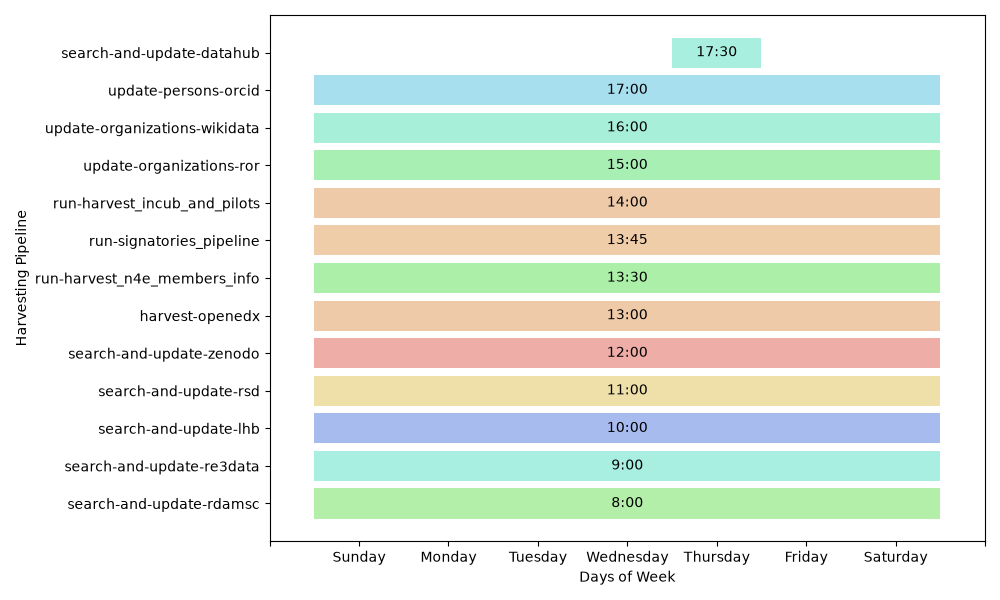
Update cycles. The harvesting scripts run on a fixed weekly schedule, automated with Celery as the distributed task queue and RabbitMQ as the message broker between Celery workers and the queue.
EduTrain
The central portal is a Learning Management System implemented using Open edX, a robust, open-source platform designed to create, deliver, and manage online courses. Both instances — test and production — are maintained using Tutor, a command-line tool that simplifies deployment and management of Open edX. Tutor uses Docker containers to encapsulate all necessary components, including containers for the LMS, content management, database, and other services, enabling easy scaling, updates and maintenance.
Open edX requires various subdomains to differentiate and direct users to distinct functionalities such as courses, administrative tools, user profiles and interactive content. A custom theme gives EduTrain the same look as the other NFDI4Earth products and is versioned as its own GitLab project. A specialized setup embeds interactive Jupyter notebooks directly into courses, so learners can execute code, visualize data and explore concepts in real time without leaving the course environment.
Support apps and web apps
The support-apps VM exists solely as a production instance and deploys all
services as Docker containers. Its purpose is to provide various support
services that aid in overall infrastructure management and operation — it hosts
the Portainer UI, the landing pages (production and staging, served by nginx
from a GitLab project at /var/www), and JupyterHub, a multi-user server
for Jupyter notebooks that serves notebooks to a predefined group of users,
supports multiple instances, and integrates with various authentication
mechanisms.
The web application service (webapps.nfdi4earth.de) hosts community solutions on an NFDI4Earth-provided virtual machine — see section 4.