
UBA-SNS (Semantic Network Service) arc42 section 8
Crosscutting Concepts
This section describes crosscutting rules and principles that concern more than one building block and are relevant for the overall system.
Services
The web services of SNS provide semantic support for the applications of providers of environmental information (for example, environmental portals). All services have a graphical user interface as well as an API for integration into specialist applications.
The services include:
- Search: search the data holdings using search terms
- SimilarTerms: output of similar concepts for a search input
- AutoClassify: automatic keyword assignment for documents using the SNS vocabulary
- Anniversary: output of events “today, X years ago”
The technical interface descriptions are publicly available at the following link: https://sns.uba.de/de/api
Search
Search makes it possible to find matching technical terms or environmental events using search terms and search spaces. In UMTHES, information about alternative labels for the found technical term as well as its relationships to other technical terms in the SNS vocabulary is also available. Definitions for determining the meaning of the technical terms are also available as additional information in most cases.
The service is available at the following URLs:
- https://sns.uba.de/umthes/de/search.html
- https://sns.uba.de/chronik/de/search.html
Known integrations:
- InGrid: https://dev.informationgrid.eu/umweltchronik
SimilarTerms
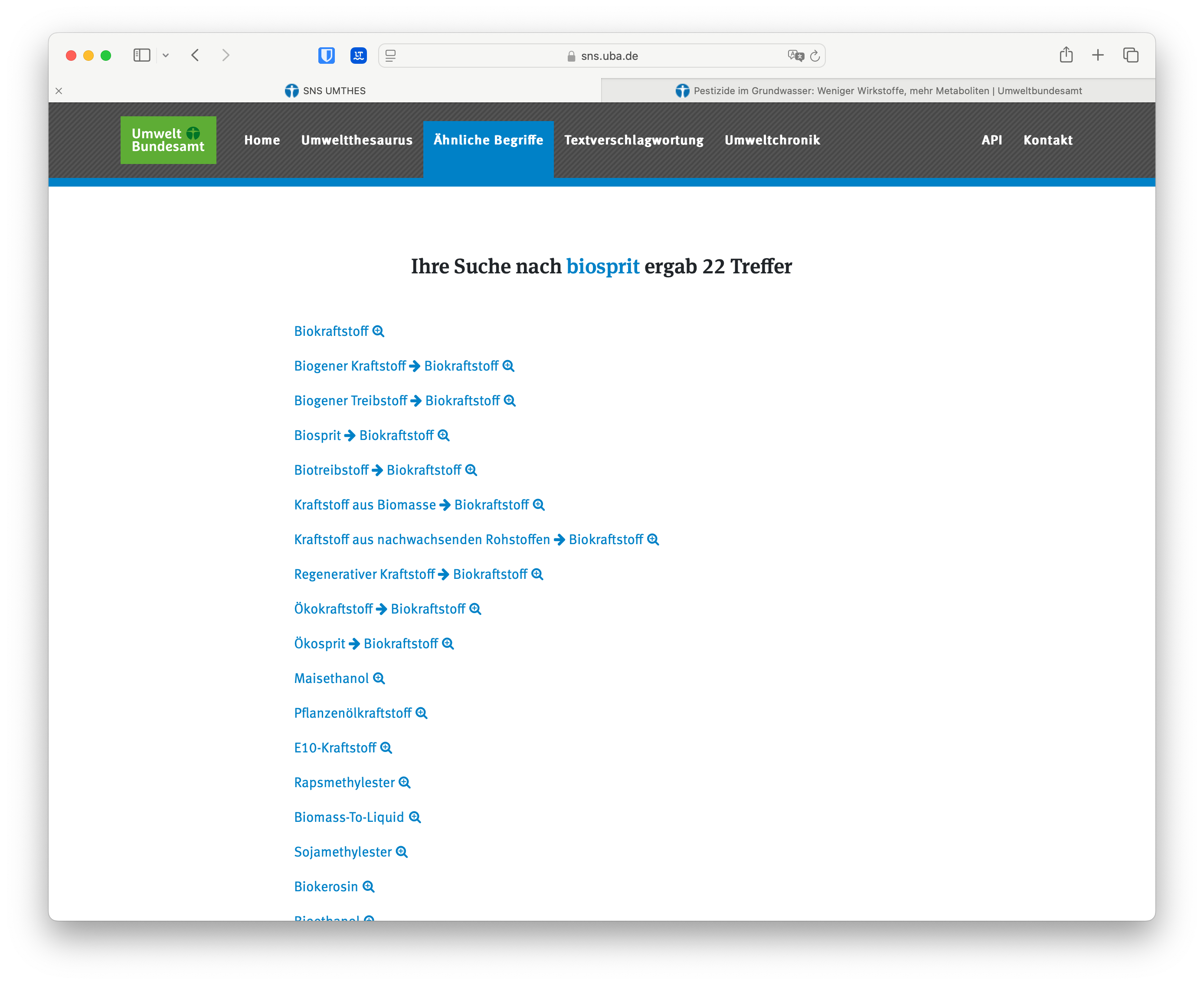
This is a service for finding semantically “similar” words for an entered search term. For example, for a search for “Biosprit”, SimilarTerms returns the similar concepts “Biokraftstoff”, “Ökosprit”, and “Kraftstoff aus Biomasse”, among others.
The service is available at the following URL: https://sns.uba.de/umthes/de/similar.html
Use Case
The SimilarTerms service can also be used to improve search in specialist applications. For example, a search with the string “Biosprit” could also take into account the concepts “Biokraftstoff” and “Ökosprit” mentioned above. This would enhance the search result.
AutoClassify
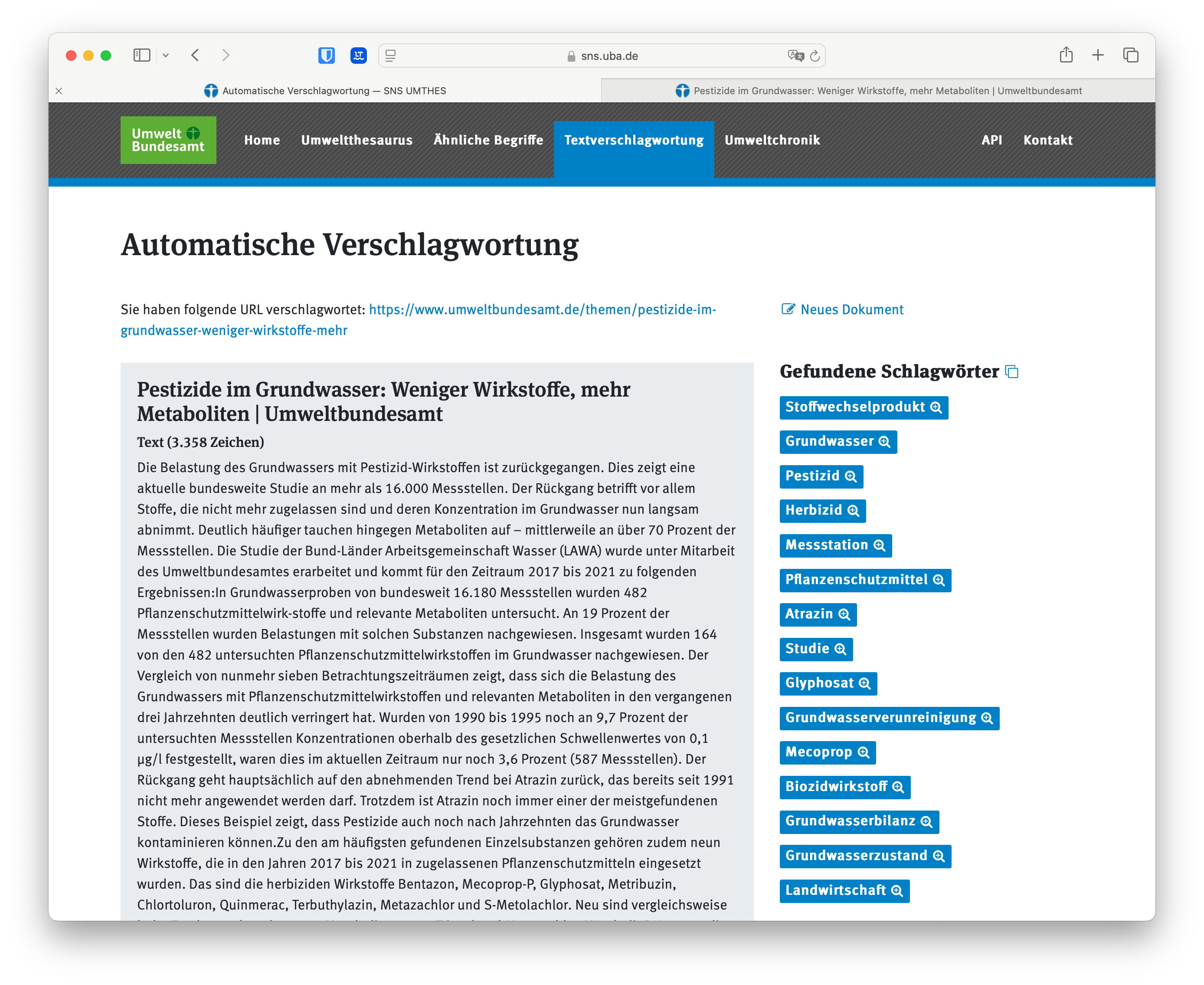
AutoClassify is a service for the automatic keyword assignment of documents. The service breaks an input text down into its components, uses these to search the UMTHES vocabulary, and then returns matching concepts (keywords) including a score as a response.
AutoClassify supports the analysis of entered free text, but it is also possible to enter just a URL. When analyzing a URL, AutoClassify attempts to extract the main text body of the web page (that is, without page navigation, advertising, and so on) and then performs the text analysis.
The service is available at the following URL: https://sns.uba.de/umthes/de/classification.html
Anniversary
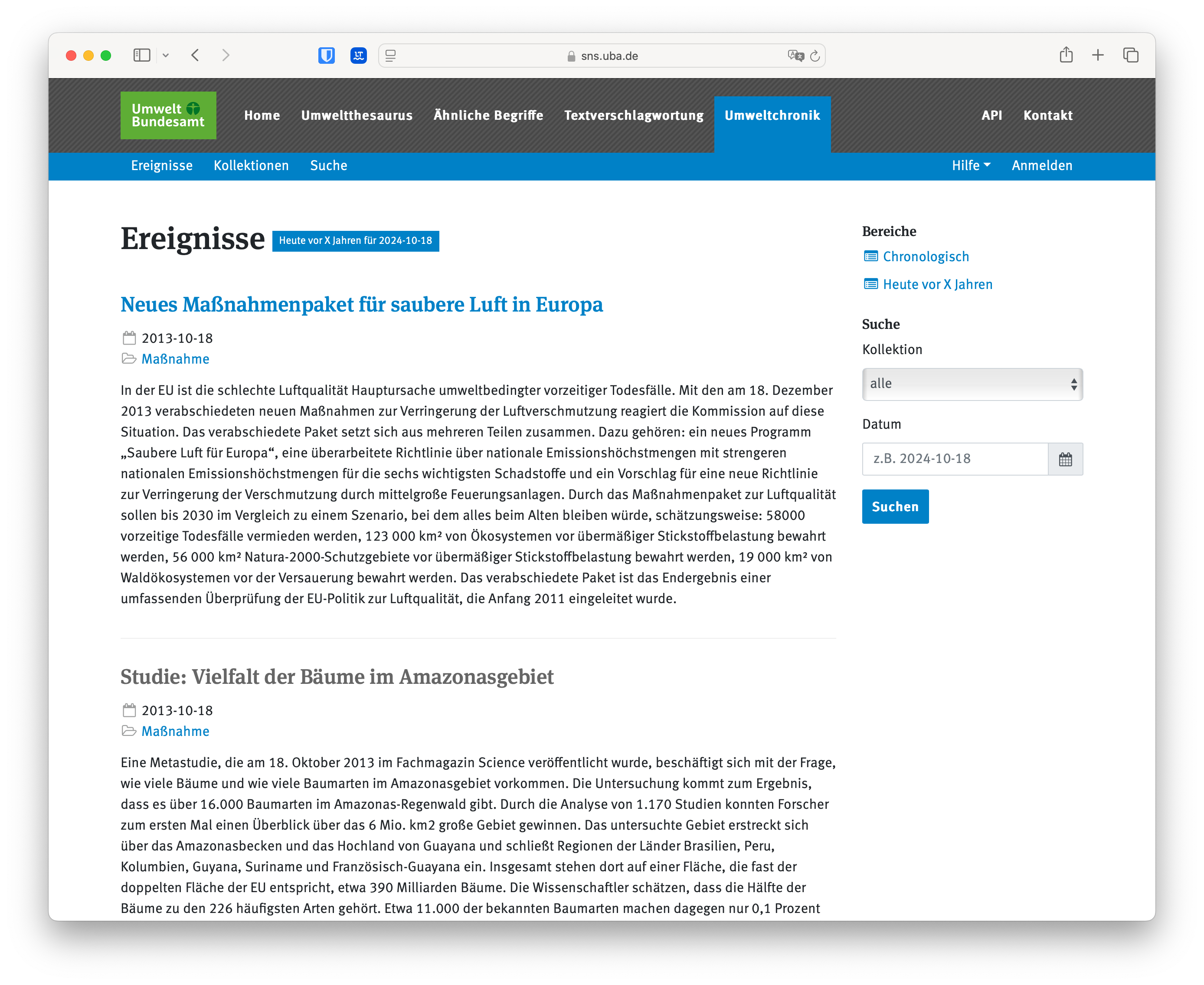
This service outputs environmental events that occurred “x years ago” on a freely selectable date (if no date is entered, the current date is used).
The service is available at the following URL: https://sns.uba.de/chronik/de/anniversary.html
iQvoc
iQvoc is an open source tool developed by INNOQ for managing vocabularies (classifications, thesauri, and so on) that combines ease of use with Semantic Web standards.
iQvoc supports a wide range of functions that cover all aspects of this management:
- Import/export of existing vocabularies in SKOS format
- Multilingual display and navigation in any common web browser
- Editorial functions for registered users on the web
- Use of the vocabulary in the Linked Data network
iQvoc relies on current technologies and a modular architecture and can be easily extended. iQvoc is available as open source under the Apache 2.0 license.
Import/export of existing vocabularies in SKOS format
The Simple Knowledge Organization System (SKOS) is a widely used RDF schema for representing vocabularies such as glossaries, classifications, taxonomies, and thesauri, and is supported by most specialized applications. iQvoc fully supports SKOS, including collections and mapping properties. An extension of iQvoc for the SKOS Extension for Labels (SKOS-XL) is also available.
Multilingual display and navigation in the web browser
iQvoc supports both multilingual vocabularies and a multilingual user interface. The two can be combined as needed. In the vocabulary, multilingualism applies to all text elements, that is, labels, definitions, and all forms of notes.
Navigation is intuitive through direct links and expandable hierarchical displays. This works in all common browsers. The appearance can be easily and extensively customized thanks to the modern, modular HTML architecture.
Editorial functions for registered users on the web
iQvoc is the perfect tool for a geographically distributed editorial team. Everyone works on the same data basis on the web. The editorial team includes the roles editor, publisher, administrator, and guest. The workflow begins with checking out (or newly creating) individual concepts. All changes are initially hidden from the outside and locked against concurrent editing. Editing can, however, be handed over to other editorial team members. A formal consistency check supports quality. The publisher can approve, discard, or return changes for further editing. A dashboard shows the editorial team the current editing status at any time.
Use of the vocabulary in the Linked Data network
iQvoc supports Linked Data technology, including content negotiation. Depending on the requested MIME type, the same concept URI returns HTML, RDF/XML, NTriples, or Turtle syntax. In combination with a triple store, a SPARQL endpoint also becomes available.
Role System
The role system of iQvoc includes guests, readers, editors, match editors, publishers, and administrators:
| Role | Description |
|---|---|
| Guest | Use the API, read content |
| Reader / registered user without permissions | View unpublished content |
| Editor | Data maintenance, new versions, submit for review |
| Publisher | Publish changes, propose changes |
| Administrator | Unlock concepts, user administration, data import and export, system configuration |
A normal visitor to the site is a guest. After logging in, they can become a reader, who may only read and has no other permissions. An editor is responsible for maintaining the vocabulary and can therefore edit it. A match editor can only edit concepts, while the publisher is responsible for checking and publishing the changes made. The administrator is responsible for configuring and managing the system, but also has all the rights of the other roles.
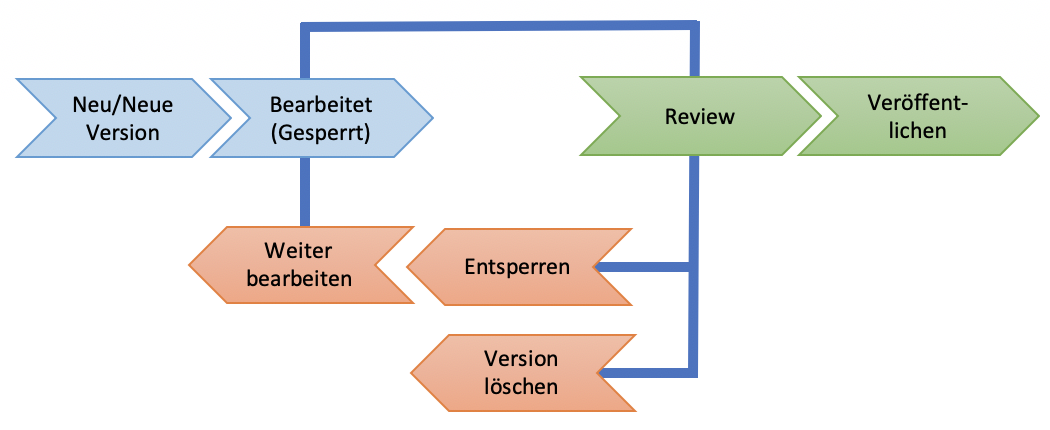
The editing workflow starts with creating or checking out individual concepts. All changes are invisible to the public at this stage and are visible only to editors, publishers, and administrators. When editing, the concept is also assigned to the editor and locked for everyone else, so that no editing conflicts can occur. Editing can, however, also be handed over to another editor. A consistency check ensures the quality of the data record. Publishers can publish changes as well as discard them or recommend them for further editing. In addition, the editorial team can get an overview of all concepts currently being edited on a dashboard. In brief summary, the workflow can be visualized as follows:
Extensions
The complete iQvoc/UMT architecture is based on “Rails Engines”, which make it possible to assemble an application from several sub-applications. A Rails Engine can be thought of as a miniature application that provides additional functionality for the main application. In this respect, it is also similar to a plugin. More details on Rails Engines can be found in the Rails documentation.
There are currently various extensions to the functions of iQvoc, generally publicly available. These are implemented in the form of Rails Engines. The extensions include:
| Name | Description | URL |
|---|---|---|
| iqvoc_skosxl | Extends iQvoc with an independent label entity and implements the W3C SKOS-XL standard. This makes labels uniquely identifiable and also makes it possible to represent relationships between different labels (for example, translation relationships). | https://github.com/innoq/iqvoc_skosxl |
| iqvoc_compound_forms | Extends iqvoc_skosxl with the part-whole relationship on a label basis (for example, the label “Abbau von natürlichen Ressourcen” consists of the label “Abbau” and the label “Natürliche Ressource”). This extension is also significant for automatic keyword assignment by AutoClassify. | https://github.com/innoq/iqvoc_compound_forms |
| iqvoc_inflectionals | Makes it possible to define alternative spellings and inflections of labels (for example, for Baum: Bäume, (des) Baumes). This extension also supports the generation of German and English spellings based on ending codes. | https://github.com/innoq/iqvoc_inflectionsl |
| iqvoc_similar_terms | This extension implements the service for returning similar concepts for a search term. | https://github.com/innoq/iqvoc_similiar_terms |
| iqvoc_autoclassify | This extension implements the keyword assignment service of UMTHES. The extension returns a list of concepts from the UMTHES vocabulary, including a score, matching an input text (text, URL). | https://github.com/innoq/iqvoc_autoclassify |
In addition to the Rails Engine extensions, there are two RDF extensions that are essential for iQvoc:
| Name | Description | URL |
|---|---|---|
| iq_triplestorage | Allows interaction with RDF triple and quad stores in Ruby. | https://github.com/innoq/iq_triplestorage |
| iq_rdf | Makes it possible to render RDF with the Ruby on Rails framework | https://github.com/innoq/iq_rdf/ |
Development
Repositories
Unlike the source code of the specialist applications, the extensions already mentioned are available under OSS and are therefore also used by other developers. For this reason, the extensions must not contain application-specific code (for example, for UMTHES); instead, the class must be extended in the respective specialist application. At the same time, general functionality should not be implemented in the specialist applications, but should be made available to the general public through the OSS repositories.
This is illustrated by way of example using concept.rb. The most basic iqvoc/app/models/concept/base.rb is located in iQvoc, but is extended there directly by the SKOS concept class. iQvoc-SKOS-XL then extends the concept class in turn to incorporate the changes needed for SKOS-XL, before the concept is finally defined in UMTHES. Alternatively, however, a class can also be written completely from scratch, as UMTHES does with iqvoc_umt/app/models/umt_ability.rb instead of extending iqvoc/app/models/ability.rb. In that case, however, the iQvoc config entry must also be adjusted, which is covered in more detail in the next section.
Settings
Because iQvoc is a generic thesaurus framework that can be assembled from extensions, development differs from classic Ruby on Rails applications. In principle, every iQvoc class can be individually extended or overridden. The configuration for this is found under config/initializers/iqvoc.rb. The extended classes must be entered there so that they are also used by iQvoc. The possible settings can be found in iqvoc/lib/iqvoc.rb or in the classes referenced there, such as iqvoc/lib/iqvoc/configuration/core.rb. In UMTHES, the specific settings are set in iqvoc_umt/config/initializers/iqvoc.rb.
Iqvoc.config do |cfg|
  cfg.register_settings({
    # ...
    'available_languages' => ['de', 'en'],
    'languages.pref_labeling' => ['de'],
    'languages.notes' => ['de', 'en'],
    # ...
  })
end
Here, the languages in which the system and its entities are available are initially defined. These settings can be overridden through the web interface under System. Changes are stored in the database table configuration_settings, which takes precedence over the configuration file.
If a standard iQvoc file needs to be extended, as in the case of Concept::UMT::Base, for example to add a validation, the file can either be copied from iQvoc or extended, but it must also be entered in iqvoc.rb with Iqvoc::Concept.base_class_name = 'Concept::UMT::Base'. Instead of the concrete class, the code therefore uses Iqvoc::Concept.base_class to call methods on the concepts, so that not all class names need to be changed when extending. This works analogously for all other classes, for example for the label or ability class.
Furthermore, Iqvoc::Entity.view_sections (for example, Concept/XLLabel) can be used to define the tabs displayed in the respective entity views. Iqvoc.searchable_class_names defines the entities usable in search. Because this can sometimes make it unclear where a piece of information is rendered, the path to the view file is rendered into the page source in an environment started in development mode:
<!-- Partial: /Users/dev/.rbenv/versions/2.5.5/lib/ruby/gems/2.5.0/bundler/gems/sns_theme-5087ffabdcf0/app/views/layouts/_navigation.html.erb -->
In general, the rendered partials are defined dynamically in the respective model classes, demonstrated here by way of example using app/models/concept/base.rb from iQvoc:
# app/models/concept/base.rb
def self.inline_partial_name
  'partials/concept/inline_base'
end

def self.new_link_partial_name
  'partials/concept/new_link_base'
end

def self.edit_link_partial_name
  'partials/concept/edit_link_base'
end

def self.dashboard_path
  'dashboard_path'
end
These methods can then simply be overridden in an extension class.
Style Guide
SNS consists of three completely autonomous applications. The visual appearance of the applications is largely identical, so that switching between the applications does not feel like a visual break to users. This is achieved through a unified style guide, which is developed in isolation and used by every application.
The source code of the UBA style guide used by SNS is available here: https://github.com/innoq/uba-bootstrap-theme
Technically, the style guide is based on Bootstrap 5. The style guide is referenced by every application as an NPM dependency in the package.json file. The respective application pulls in the central assets (stylesheets, JavaScript, images, and fonts) at build time during deployment. It is therefore possible for the applications to be based on different versions of the central style guide. In addition to the central assets, the applications also define specific stylesheets and JavaScript functions.
When updating the Bootstrap version used, the central style guide must be updated first. Afterward, the HTML markup of all iQvoc applications may need to be adjusted to the new version.
Semantic Web Basics
Semantic Web
The internet is ubiquitous today and can no longer be imagined away from everyday life. The World Wide Web (WWW) has transformed entire industries and created new business models. This makes the web a symbol of the development from an industrial society to an information society.
The internet is, for the most part, created for humans. The content of web pages can indeed be captured by machines (for example, by search engines), but genuinely capturing context and understanding meaning is only possible to a limited extent for machines. A network understandable to both humans and machines, in which goods and services can be brokered and questions understood and automatically answered, is referred to as the next stage in the evolution of the internet.
Two approaches exist for this. The first approach is based on methods of artificial intelligence that aim to transfer human cognitive perception to machines.
An orthogonal approach is that of the Semantic Web. Here, the goal is to provide content for optimized processing by machines. This implies a formal annotation of knowledge. The Semantic Web requires shifting the distributed network from the presentation layer to the data layer. Accordingly, content must in the future be linked with each other at the data layer to ensure optimized information processing.
The Semantic Web is a very large field of topics and ranges from subjects such as Linked Open Data to questions of artificial intelligence.
Linked Open Data (LOD)
Linked Open Data is a community effort to publish large data sets. Linked Open Data defines rules and best practices for publishing data on the basis of web standards and relating it to other data using semantic technologies. The term “open” has two meanings in this context: on one hand, data should be freely accessible, and on the other hand, it should be published exclusively through open standards. Linked Open Data dates back to 2006. In that year, Tim Berners-Lee published the article Design Issues: Linked Data. The following basic principles emerge from this article:
- Use URIs to identify things
- Use HTTP URIs so that these things can be accessed
- URIs should point to useful information, provided using the RDF and SPARQL standards
- Use references to other URIs, so that further knowledge becomes reachable
Linked Open Data is designed for the use of open standards and builds on the technical architecture of the internet. The first principle states that only URIs are used to identify resources. This is understood to include, in addition to web resources and real objects such as people, abstract things such as relationships and descriptions of and between objects.
The second principle describes the resolution of URIs via the Hypertext Transfer Protocol (HTTP). This allows concepts to be referenced across physical boundaries. In addition to humans, machines such as web crawlers can also be addressees. For this, the HTTP specification includes a technical implementation with content negotiation. Depending on the requesting client, a web server can respond with an HTML representation optimized for humans or a machine-readable RDF representation.
The third principle defines the use of standardized data formats. While HTML is the preferred data format for documents readable by humans, this principle describes the use of RDF. RDF allows the formal annotation of any content and supports automatic processing by machines.
The fourth principle describes the use of hyperlinks to connect data. In the Linked Data context, these hyperlinks are called RDF links. Compared to classic hyperlinks, these RDF links have, in addition to the reference, a typed, semantic meaning. For example, an RDF link between a person and a string can describe that the following string is an email address.
Resource Description Framework (RDF)
Model
The Resource Description Framework (RDF) is a graph-oriented data model for describing arbitrary things in the form of resources. RDF provides a formal language for exchanging knowledge and information. Things or resources are identified by a Uniform Resource Identifier (URI) and described using properties and concrete values. Every RDF statement is modeled in the form of a triple and consists of a subject, predicate, and object.
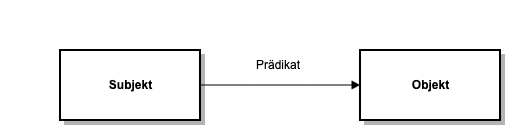
Subject, predicate, and object are referenced by URIs. The object can optionally also be represented by a string literal with an optional data type. The predicate describes the semantic relationship between subject and object.
RDF follows a data-driven approach, meaning no classes are needed to form instances. This approach makes RDF very flexible. RDF consists of the RDF model and the concrete syntax for serialization. The RDF model comprises the set of all triples, consisting of subjects, predicates, and objects, and spans the graph. However, RDF alone cannot express semantics, since it only establishes relationships between things. The semantic description of objects and relationships is done through ontologies. In use, ontologies take on the role of a vocabulary. In the RDF context, a vocabulary refers to a set of identifiers for individuals, relationships, and classes.
Serialization
RDF graphs can be serialized into several data formats. The following section addresses common RDF serializations such as RDF/XML and the Terse RDF Query Language (Turtle).
The concrete syntax will be explained using the following example.
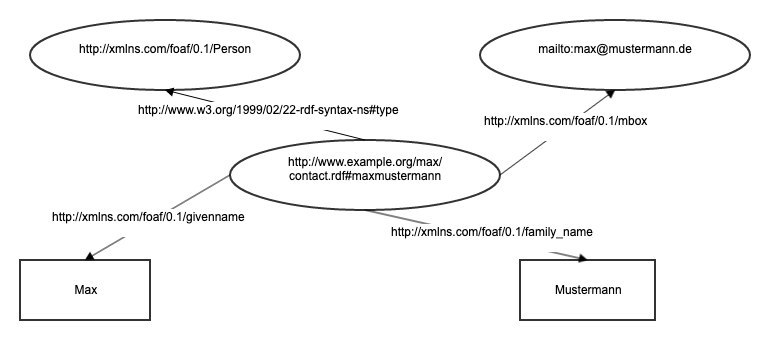
The example shows the modeling of the person Max Mustermann using the Friend of a Friend (FOAF) vocabulary. In addition to first and last name, an email address is also modeled. The ovals in this graphical notation describe other resources. Rectangles visualize string literals.
RDF/XML
A widely used type of RDF serialization is RDF/XML. This serialization format uses the Extensible Markup Language (XML) as a meta-language. The encoding of triples is hierarchical. Due to the flexibility of the XML meta-language, RDF graphs can be serialized into RDF/XML in various ways. An advantage of this serialization is the wide distribution and acceptance of XML. Corresponding libraries for XML processing exist for nearly every programming language. In contrast to more modern serialization formats, RDF/XML is harder for humans to read.
The example given above would be serialized in RDF/XML as follows:
<rdf:RDF xmlns:rdf="http://www.w3.org/1999/02/22-rdf-syntax-ns#" xmlns:foaf="http://xmlns.com/foaf/0.1/" xmlns="http://www.example.org/max/contact.rdf#">
  <foaf:Person rdf:about="http://www.example.org/max/contact.rdf#maxmustermann">
    <foaf:mbox rdf:resource="mailto:max.mustermann@example.org"/>
    <foaf:family_name>Mustermann</foaf:family_name>
    <foaf:givenname>Max</foaf:givenname>
  </foaf:Person>
</rdf:RDF>
Within the root node, namespaces are replaced by prefixes. Prefixes allow a more compact syntax and contribute to readability. All triples that use a FOAF class as the subject are grouped hierarchically within a FOAF Person element.
Terse RDF Query Language (Turtle)
Turtle is an alternative RDF syntax that emphasizes readability. Turtle originates from a simplification of Notation3 (N3), proposed by Tim Berners-Lee in 1998.
N3 also writes triples one after another in any order and contains operators for more complex expressions such as paths and rules. The N-Triples and Turtle formats developed from N3. N-Triples dispense with the more complex expressions of the N3 syntax mentioned above and are limited to describing RDF graphs. The N-Triples serialization was subsequently extended with a shorthand notation, leading to the Turtle syntax that is widely used today.
The example given above is represented in Turtle as follows:
@prefix foaf: <http://xmlns.com/foaf/0.1/> .
@prefix rdf: <http://www.w3.org/1999/02/22-rdf-syntax-ns#> .
@prefix : <http://www.example.org/max/contact.rdf#> .

:maxmustermann a foaf:Person ;
  foaf:givenname "Max" ;
  foaf:family_name "Mustermann" ;
  foaf:mbox <mailto:max.mustermann@example.org> .
In lines 1-3, prefixes for a more compact notation are defined, analogous to the XML serialization. The period ends the sequence of an RDF triple. The Turtle serialization includes several shorthand notations. For example, an a used instead of a predicate abbreviates the commonly used rdf:type. The semicolon means that the following predicate/object combinations refer to the same subject. The predicate/object combinations in lines 6-8 therefore all refer to the subject :maxmustermann from line 5.
Simple Knowledge Organization System (SKOS)
The Simple Knowledge Organization System (SKOS) is a W3C standard for knowledge representation. SKOS provides a formal language, based on RDFS and OWL, for defining vocabularies, taxonomies, and thesauri.
While knowledge representation within a Knowledge Organization System (KOS) has been practiced for some time, processing and exchange within computer networks are not yet commonplace. SKOS was developed for this purpose. SKOS is based on the fundamental ideas of the Semantic Web and was intended, from then on, to support the modeling of reusable knowledge representations over the internet. Another criterion in the development of SKOS was easy transformation from another thesaurus standard.
The SKOS specification defines semantic relationships for defining hierarchies, associations, and links. The figure visualizes the semantic relationships of the specification:
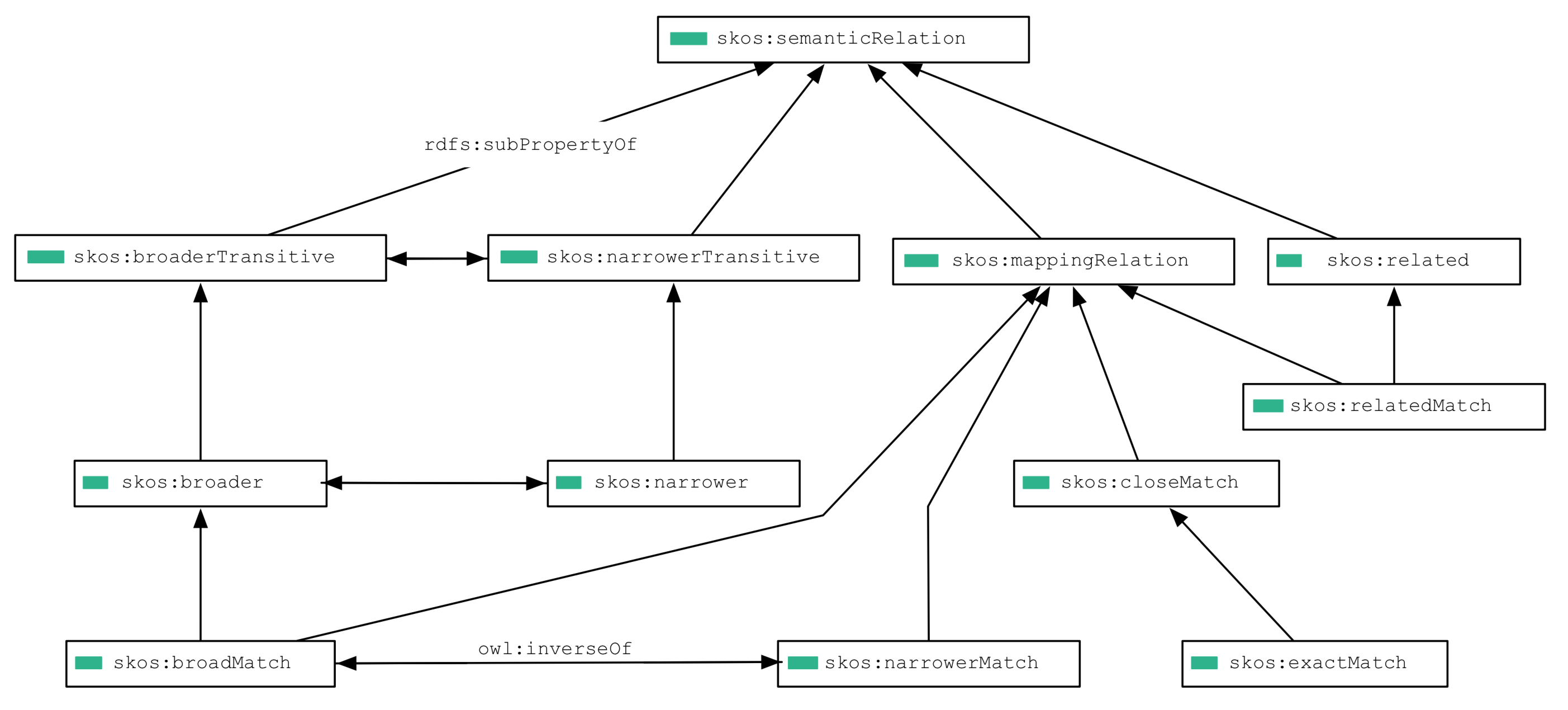
Directed arrows symbolize the rdfs:subPropertyOf relationship. At the top level, skos:broaderTransitive, skos:narrowerTransitive, skos:mappingRelation, and skos:related are defined as subtypes of skos:semanticRelation. The relationship between skos:broaderTransitive and skos:narrowerTransitive represents owl:inverseOf from the OWL specification. This relationship describes the opposite semantic meaning between the elements. Knowledge of the meaning of such relationships can be used to form inferences.
For this document, the semantic relationships skos:broaderTransitive and skos:narrowerTransitive, as well as their respective directly assigned subtype, are relevant. skos:narrower is used to model specific types of entities (for example, laptop skos:narrower computer). The skos:broader relationship describes the opposite relationship (computer skos:broader laptop).
Requirements for an Operations Provider
Architecture and Scaling
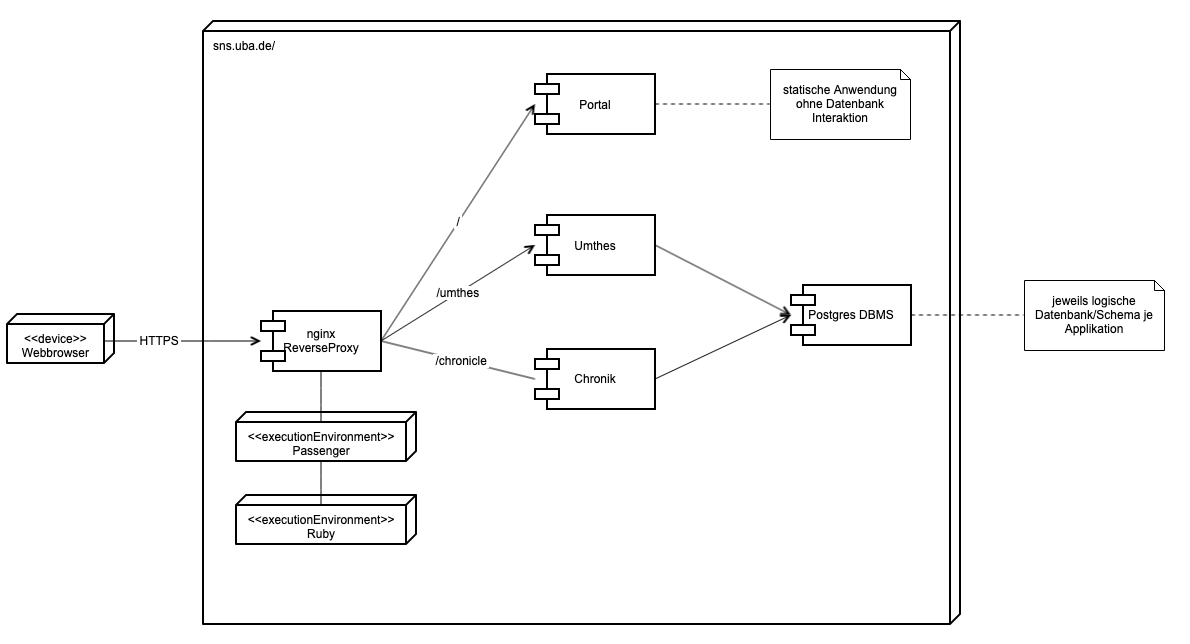
The SNS applications should be deployed and operated on a dedicated virtual or physical machine. All three applications run as Docker containers on a container platform. Data storage must be implemented in a logically separate, dedicated database (the databases can be operated on a shared database host).
A web server acts as a reverse proxy in front of the applications, handling the distribution to the respective application. Each application is run by a variable number of Passenger worker processes (Passenger is a Ruby application server).
Software
- Operating system: As the server operating system, we recommend the current version of Ubuntu in the LTS (Long Term Support) release.
- Ruby: Ruby (MRI) in the current version (at least 3.0)
- Database: The SNS system requires different database management systems. The environmental thesaurus and the Environmental Chronicle are based on PostgreSQL.
Hardware
The hardware requirements apply per machine/VM:
- CPU: 8 cores, 64-bit
- RAM: at least 16 GB RAM
- Disk storage: at least 80 GB, preferably SSDs
Monitoring
All instances should be automatically monitored by the provider. This includes standard metrics such as CPU, RAM, and I/O utilization, as well as maintaining application-critical processes. These include:
- Web server
- Application server
- Database server
Backup
A daily automatic backup of the system and application databases must be performed. Developers must be given the ability to independently manage and request backup processes (manual triggering, restoring, and so on), or to do so on a ticket basis.
Deployment and Maintenance
For the deployment of application sources as well as maintenance tasks, developers must be provided with full SSH access through a separate user; root privileges are not required for this. Developers must have the ability to independently:
- restart the web server and Docker containers
- run jobs in the context of the application directory
- connect to the database console as the respective application user
In addition to normal read, write, and delete operations, the database user also requires permissions to perform schema changes.
Requirements for the Maintenance/Further Development Provider
A new SNS provider, to be selected by UBA, is provided with both the current source code of SNS and SNS documentation. Introductory workshop(s) may also be possible or necessary.
Technologies
Must-have
- Many years of experience in software development and maintenance
- Git and GitHub
- SQL, PostgreSQL, and ActiveRecord
- Ruby on Rails
- Web technologies, in particular HTML and CSS
- JavaScript
- Rails hosting/deployment
Should-have
- RDF
- Semantic Web standards
- SKOS (https://www.w3.org/TR/skos-primer/)
- Rails Engines
- Linked Data
Nice-to-have
- Thesaurus/vocabulary management systems
- iQvoc (http://iqvoc.net/)