
docToolchain v4 arc42 section 5
Building Block View
This section decomposes docToolchain v4 into its static building blocks at three levels of detail. The key structural change from v3: Gradle Orchestration and the compiled Core Module are removed. The architecture simplifies to two layers plus an ecosystem of companion tools.
Level 1: Whitebox Overall System
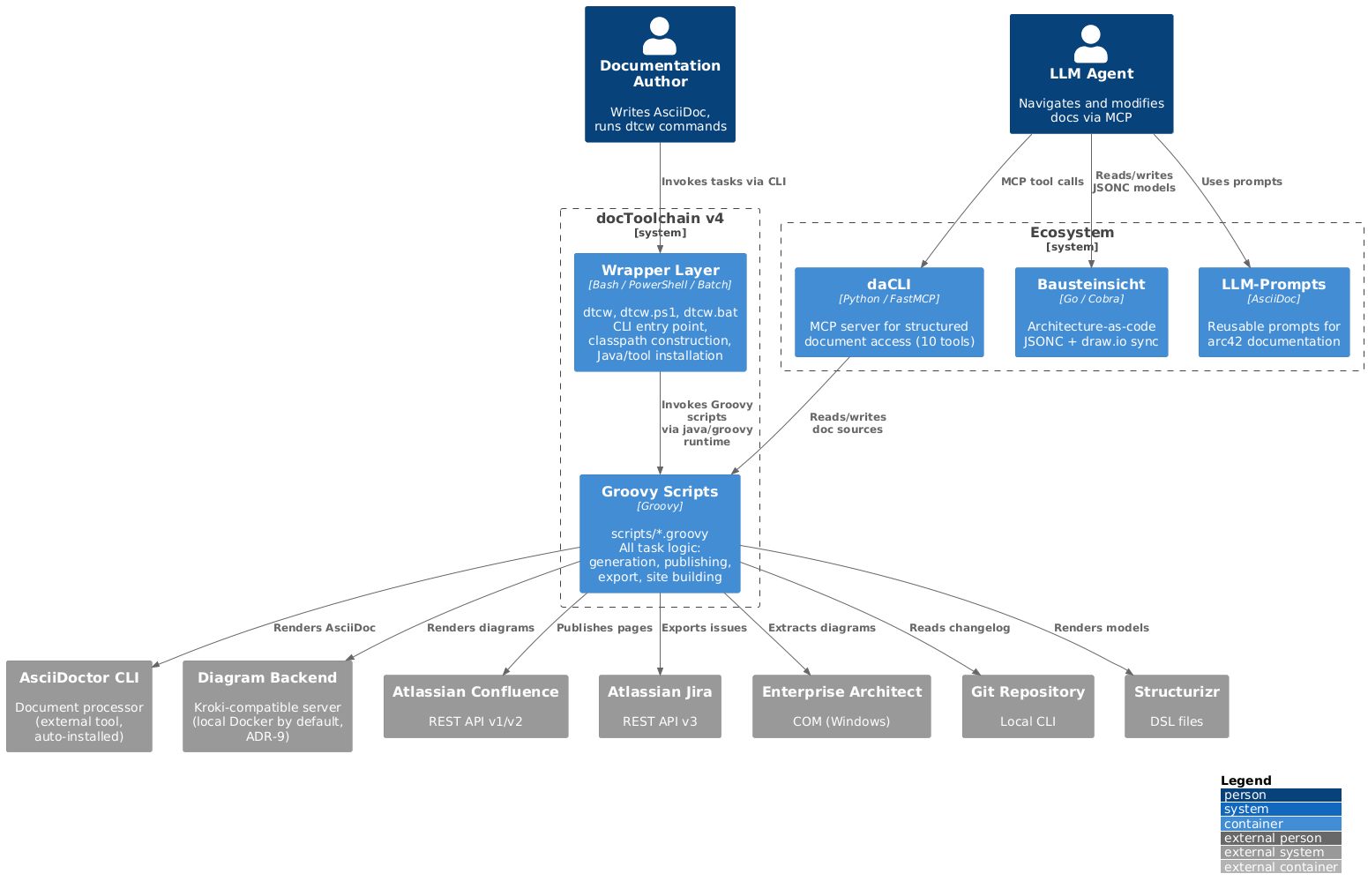
Tip: Source of truth (architecture-as-code). This Level-1 view is also modelled as a versioned Bausteinsicht JSONC model at
models/level1-container.jsonc. That model is the machine-readable source of truth; the C4-PlantUML above mirrors it and remains the rendered artifact (Bausteinsicht has no PlantUML exporter yet — see ADR-15). When you change the structure, edit both until an export path is wired (tracked as technical debt in Risks and Technical Debt).
Motivation
v4 simplifies from four layers (Wrapper -> Gradle -> Script Plugins -> Core Module) to two layers (Wrapper -> Scripts). The Gradle orchestration layer and the compiled Core Module are eliminated. Business logic returns to scripts. Companion tools (daCLI, Bausteinsicht, LLM-Prompts) handle LLM integration as an ecosystem rather than embedding it into docToolchain itself.
Note
This Level-1 view is a container zoom: it shows the two internal building blocks (Wrapper, Groovy Scripts) and the external systems they call at runtime — AsciiDoctor, Confluence, Jira, and the diagram rendering backend (Kroki, ADR-9). The remaining Chapter 3 context actors (Enterprise Architect, Git, Structurizr) are reached through the same
Groovy Scriptsbuilding block (theexport*scripts) and are elided here only to keep the container diagram readable; they are not a different system boundary.The ecosystem tools differ in lifecycle: daCLI is exercised at runtime (the LLM-edit scenario S3 in Chapter 6 calls it). Bausteinsicht and LLM-Prompts are design-time companion tools — they are used by authors/LLMs while writing documentation; docToolchain core never invokes them at runtime. They are shown for ecosystem context only.
Contained Building Blocks
| Building Block | Responsibility | Interface | Location |
|---|---|---|---|
| Wrapper Layer | Cross-platform CLI entry point. Constructs classpath from lib/ directory (or resolves via Grape). Manages Java installation. Invokes Groovy scripts directly — no build framework intermediary. Detects execution environment (local/Docker/SDKMAN). |
CLI: ./dtcw [env] <task> [args]; differentiated exit codes (0/1/2/3/99, ADR-8). |
dtcw, dtcw.ps1, dtcw.bat |
| Groovy Scripts | All task logic: document generation (AsciiDoctor invocation), site generation (custom SSG), Confluence publishing, Jira export, changelog extraction, and all other features. Each script is a self-contained unit that runs without compilation. | Task entry points: one <taskName>.groovy per task, invoked as groovy.ui.GroovyMain scripts/<taskName>.groovy; config via ConfigSlurper. |
scripts/*.groovy |
| daCLI (Ecosystem, runtime) | MCP server providing 10 tools for structured document access: navigation, search, section-level read/write, validation. Separate Python process communicating via stdio. | MCP over stdio (get_structure, get_section, search, update_section, …) and a CLI. |
Separate repository (dacli/) |
| Bausteinsicht (Ecosystem, design-time only) | Architecture-as-code tool. JSONC models with bidirectional draw.io sync. Exports PlantUML/PNG for embedding in AsciiDoc. Used by authors/LLMs at design time; not invoked by docToolchain core at runtime. | CLI with --format json; produces PlantUML/PNG artifacts consumed as AsciiDoc includes. |
Separate repository (Bausteinsicht/) |
| LLM-Prompts (Ecosystem, design-time only) | Reusable prompt collection for arc42 documentation: chapter generation, ADR creation, quality scenarios, risk assessment, stakeholder analysis. Used by authors/LLMs at design time; not invoked by docToolchain core at runtime. | Prompt text (AsciiDoc) consumed by an LLM; no runtime API. | Separate repository (LLM-Prompts/) |
Level 2: Whitebox Groovy Scripts
The scripts are organized into functional groups. Unlike v3 (where scripts were Gradle task definitions applied via apply from:), v4 scripts are standalone Groovy files invoked directly.
| Category | Scripts | Purpose |
|---|---|---|
| Document Generation | generateHTML.groovy, generatePDF.groovy, generateDocbook.groovy, generateDeck.groovy |
Core document generation. Calls AsciiDoctor CLI (external tool, ADR-6) for rendering. Replaces the AsciiDocBasics.gradle approach. |
| Site Generation | generateSite.groovy, lib/MicrositeBaker.groovy, copyThemes.groovy |
Custom Groovy-based static site generator (MicrositeBaker, scripts/lib/MicrositeBaker.groovy) replacing jBake (ADR-4). Groovy SimpleTemplate engine, in-memory content model, modern HTML output. Reads jBake-compatible metadata headers. |
| Atlassian Integration | publishToConfluence.groovy, exportJiraIssues.groovy, exportJiraSprintChangelog.groovy, exportConfluence.groovy |
Confluence publishing (with smart MD5-based update detection) and Jira data export. Contains the Confluence client hierarchy (V1/V2) and Jira client/converter logic formerly in core/. |
| External Tool Export | exportEA.groovy, exportPPT.groovy, exportVisio.groovy, exportStructurizr.groovy, exportOpenApi.groovy |
Extract diagrams and models from external tools. EA/PPT/Visio are Windows-only (VBScript). |
| Data Import/Export | exportExcel.groovy, exportMarkdown.groovy, exportChangelog.groovy, exportContributors.groovy, exportMetrics.groovy, pandoc.groovy |
Import data from Excel, convert Markdown, extract Git metadata, run Pandoc conversions. |
| Utilities | collectIncludes.groovy, fixEncoding.groovy, htmlSanityCheck.groovy, downloadTemplate.groovy |
Supporting tasks: aggregate includes, fix encodings, validate HTML, download templates. |
| Configuration | config.groovy (or loaded inline) |
Loads docToolchainConfig.groovy via Groovy ConfigSlurper. Provides config access to all scripts. |
Level 3: Whitebox Atlassian Integration
The Atlassian integration scripts contain the richest business logic. In v3 this was the compiled core/ module; in v4 it returns to script form.
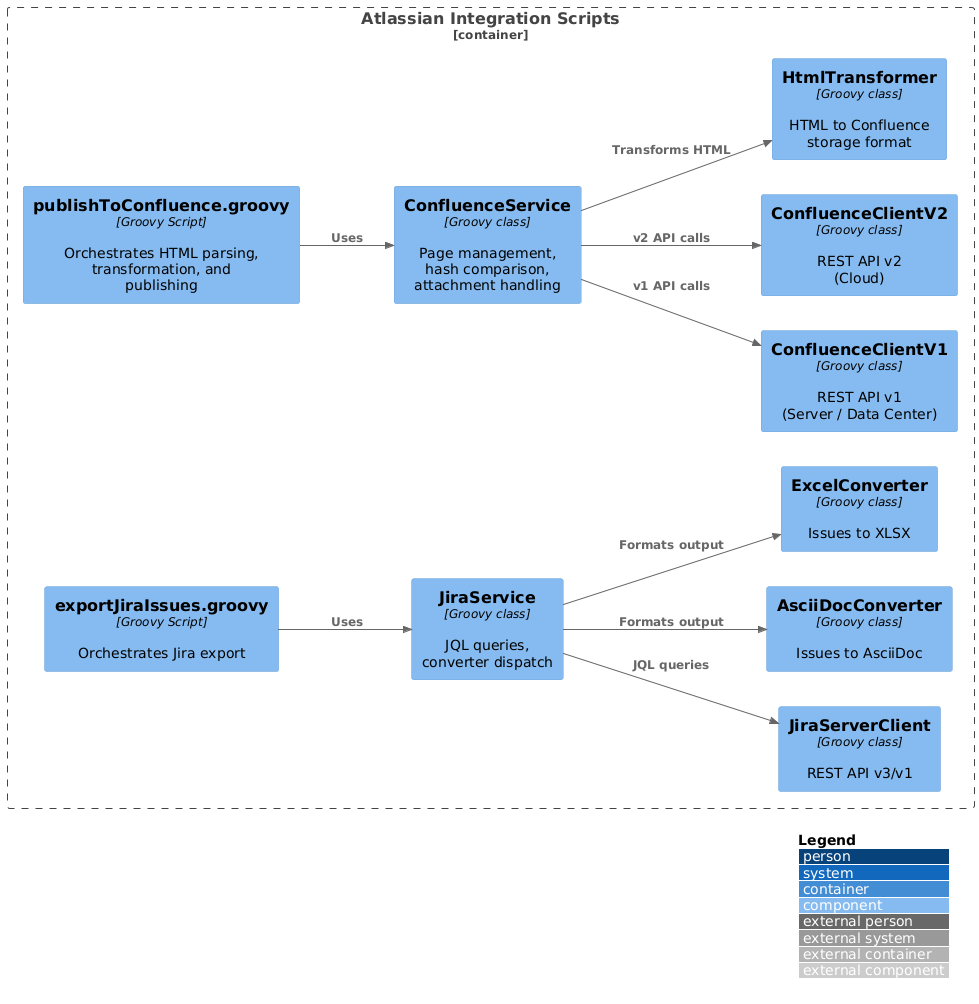
The key difference from v3: these classes are not compiled into a Shadow JAR. They are Groovy source files loaded at runtime. The script entry point (publishToConfluence.groovy) loads helper classes from a shared lib/ directory or via inline GroovyClassLoader.