
MaMa-CRM arc42 section 3
Context and Scope
3.1 (Generic) Business Context
Every MaMa instance communicates with a single mandator and one or more partner organizations, like shown in the diagram below. Partners are external service providers, for example printer, mail delivery services, scan services, call-center or internet hosting providers.
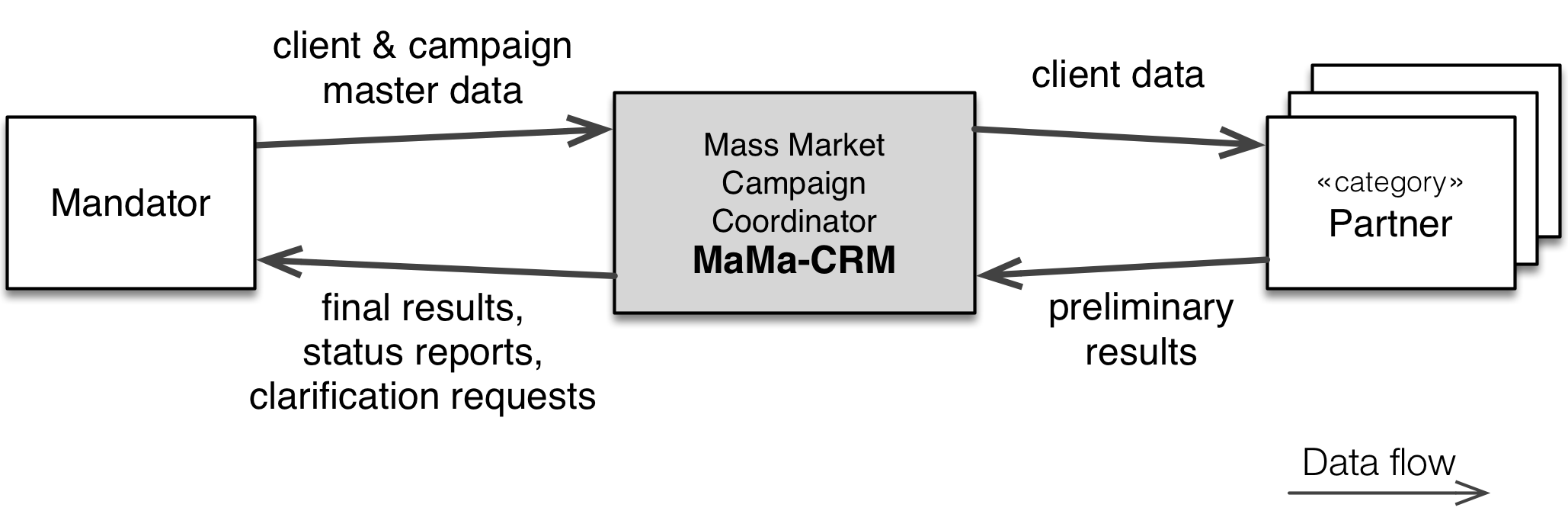
| Interface / Neighbor system | Exchanged Data |
|---|---|
| Client and campaign master data | (inbound, from mandator) Mandator transfers campaign and client master data to MaMa-CRM. |
| Final results (outbound, to mandator) | MaMa transfers final campaign results back to mandator. This is the ultimate goal of the campaign. |
| Status reports | MaMa periodically sends status reports to the mandator and interested partners. |
| Clarification requests | Sometimes client data is wrong, outdated or corrupted, so that certain activities within the campaign cannot be executed for this client. In such cases, MaMa sends clarification requests to the mandator: The corresponding client data has to be checked - and returned to MaMa in corrected way or the client is revoked and will not be processed any further by MaMa. |
| Client data (outbound, to partner) | MaMa sends client data to partners, depending on campaign business rules and processing results. MaMa has a distinct interface configured for every partner. |
| Preliminary results (inbound, from partner) | Partners send results of their respective work back to MaMa. This data is called “preliminary results”, as it requires processing and evaluation by MaMa before it can be marked as final. Process logs and partner status report are also transmitted to MaMa via this interface. |
Client data (outbound)
Client data is sent to partners on a “need-to-know” basis to achieve data minimality: Every partner organization gets only the data they absolutely require to fulfill their campaign tasks.
For example, MaMa will not disclose clients’ street address to call centers (they usually get to know name, phone contact and sometimes one or two additional attributes for verification purposes.)
On the other hand, print service providers usually don’t get to know the phone numbers of clients, as the latter is not required to deliver printed letters via postal services.
3.1.1 Formal Business Context
The diagram below contains a more formal version of the context diagram. It includes
an admin interface, which was left out in the informal version above.
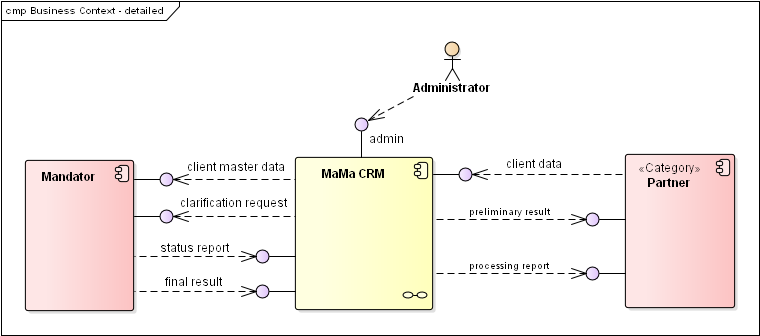
The admin interface enables MaMa and campaign administrators to perform all required
administrative tasks needed to init, configure and operate campaigns.
3.1.2 Specific Business Context: Mobile Phone Contract Modification
The following diagram details the example already shown in section 1.1.1.
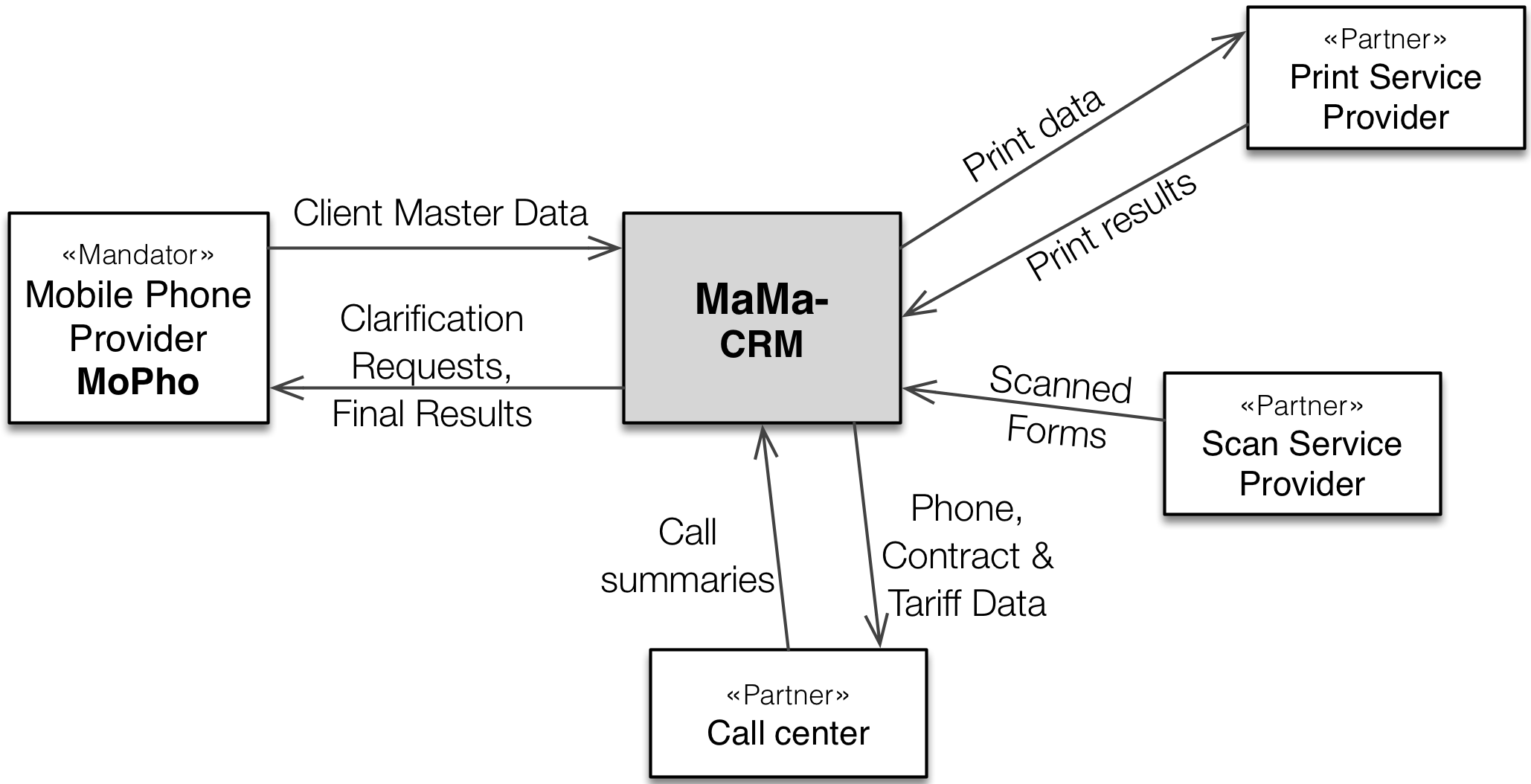
The data flows are detailed (in excerpts!) in the following table:
| Neighbor System | Exchanged Data | Format |
|---|---|---|
| Mandator (inbound) | Client Master Data: Name, Address, Contact, Contract, Tariff. Once for every client in the campaign, second as response to clarification requests. | Zip-compressed CSV, via sftp (mandator uploads) |
| Mandator (outbound) | Final results: ID, tariff and contract details for every client who accepted the contract modification proposal | Zip-compressed CSV over sftp, MaMa uploads |
| Mandator (outbound) | Clarification request | —– “ —– |
| Print Service Provider (outbound) | Print Data: Name, Address, parts of contract and tariff. | Zip-compressed, PGP-encrypted CSV via http upload |
| … | … | … |
Mapping of Attributes to CSV-Fields
For every instance of MaMa, the mapping of data attributes to fields/records in data transmissions has to be specified in detail. This is done by a domain specific language, details are described in section 8.3 on CSV-Import/Export
3.2 Technical / Deployment Context
MaMa instances are supposed to run distinct virtual machines (whereas certain1 mandators or campaigns require instances to be deployed on their own physical hardware - which results in significantly higher campaign costs.)
Details of the MaMa deployment are explained in the deployment view in section 7
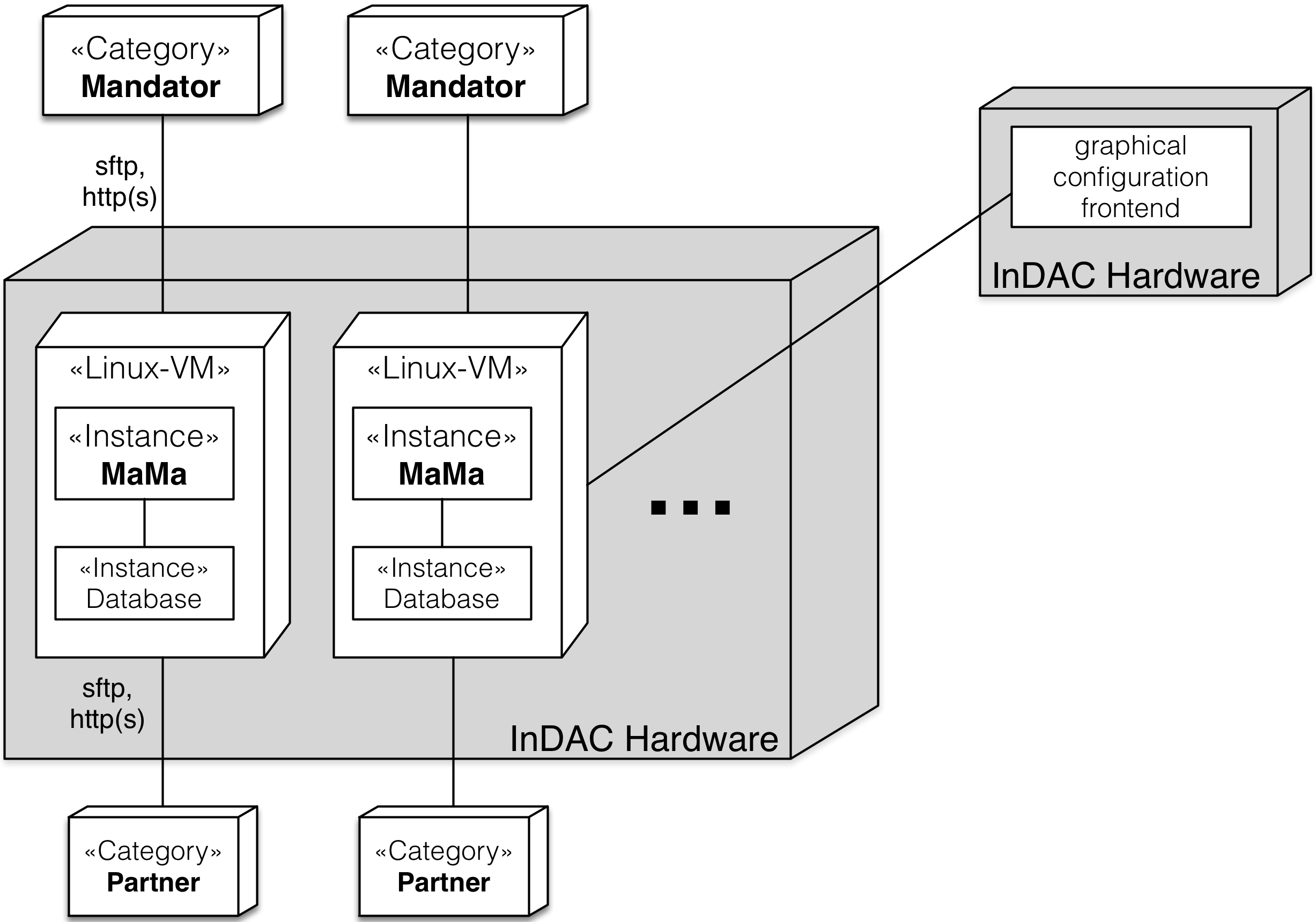
The following diagram gives a schematic overview of the typical MaMa deployment setup.
| Element | Description |
|---|---|
| «Instance» MaMa | A distinct instance of MaMa, running a specific campaign (connected to a single mandator and a number of campaign-specific partner organizations) |
| InDAC Hardware | Physical server (Dell, HP or similar), located on InDAC premises. Running RHE Linux and a virtualization environment (not shown in diagram) |
| «Category» Mandator | For every MaMa instance there is one distinct mandator. |
| «Category» Partner | For every MaMa instance there might be several different partner organizations, each one having a distinct communication channel. |
| «Instance» Database | Every MaMa instance has its own database instance, usually within the same virtual machine. |
| Linux VM | Virtualized (RHE) Linux environment. Configured to disallow unwanted external access (e.g. ssh only allowed from within InDAC) |
-
Some mandators with extremely high security requirements negotiated their own distinct physical hardware for their MaMa instance(s). ↩