
FotoMaX arc42 section 5
Building Block View
The structural design and its decomposition into building blocks of various granularity is described in this chapter. It uses different detail levels to zoom in from abstract structures into increasingly detailed and concrete elements.
Level 1: Subsystems of the Wizard
The following illustration shows the internal components of the Wizard and their interdependencies as well as their interaction with external interfaces. The latter partly interact with other software, hardware or even the different user groups on the basis of a graphical user interface.
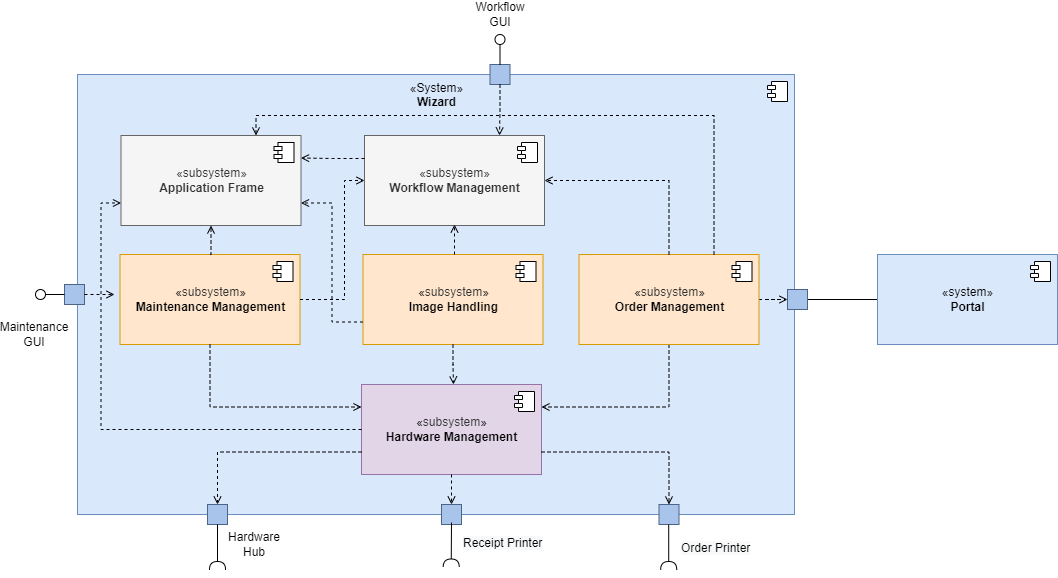
There are three different types of subsystems in the wizard:
- infrastructure (gray),
- logic (orange),
- and hardware connection (purple).
All versions of the sales units use the same infrastructure components. The logic components are provided with their actual functionality at runtime through a configuration that is specific to the sales unit. The hardware connection in turn decouples all other components from the possible printers and connection options of the sales unit.
Application Frame
| Purpose | Provides the functionality of a frame application that combines all other components at runtime. Also includes components for cross-cutting concerns such as settings management, logging, error handling, inversion of control, user interaction, etc. |
| Interfaces | No external interfaces but C# interfaces are provided for the various components. |
| Special Features | Much of the functionality is provided by the Prism framework and partially encapsulated by custom interfaces to reduce dependencies on the framework, so that WPF and Prism can be replaced in the future. Since the Application Frame is primarily a connection to the Prism Framework and a collection of loose components, there is no white-box representation of this in this documentation. |
Workflow Management
| Purpose | Contains the functionality necessary to cover ordered workflows with the software. This includes navigating forward and backward through work steps, branching in workflows and canceling operations. |
| Interfaces | Workflow Management offers few UI elements of its own as it provides the framework for the actual workflows. However, it is actually the main point of interaction for the end user via the workflow steps it aggregates. |
| Special features | Workflow Management cannot work without logic components and workflow configuration as it would only display an empty frame. |
Maintenance Management
| Purpose | Contains all features that are needed to read and change the machine state, to get information about consumables and to help with calibration. |
| Interfaces | Maintenance Management interacts with service technicians via its own GUI, which is unlocked via a special hardware dongle. Additionally, it has access to various status information of the connected devices via the hardware management. |
| Special Features | Service technicians of FotoMaX can bypass the Maintenance Management to directly access the operating system. |
| Open points | Older versions of the Maintenance GUI could be accessed via the general UI. The functionality required for this can still be found in the source code for compatibility reasons, however, it is no longer linked in the UI. |
Image Handling
| Purpose | Image Handling contains all functions that can be used to read, process and modify images. In addition, it also contains the corresponding work steps, which are triggered via workflow management at runtime and displayed to the user. |
| Interfaces | No external interfaces, since all work steps are called via the workflow engine. |
| Special Features | A large part of the functionality is provided by the Prism framework and partially encapsulated by its own interfaces to reduce dependencies on the framework, since in the future a move away from WPF and thus from Prism is possible. Since Image Handling is a collection of loose components, there is no white-box representation of this in this documentation. |
| Risks | The code in Image Handling is very disorganized and needs a thorough restructuring. Especially the exchange of image data is solved via a global context and causes confusion. See also technical risks. |
Order Management
| Purpose | Order Management handles the actual ordering. This is done via the portal in the connected case or via the local printers in the standalone case. |
| Interfaces | In the connected case, Order Management establishes a connection to the portal and forwards the incoming order to it. In the standalone case, the image data is sent to a photo printer and the proof of purchase to a connected thermal printer. Hardware Management is then addressed for this purpose. |
| Special Features | Order Management must read from the configuration which work mode the sales unit is in and then decide independently how it processes orders. |
| Open points | There is only one dialog in which the entire order is summarized. This is used equally on all Sales Units. However, the pitch providers have already stated needs for adjustments here. |
Hardware Management
| Purpose | The hardware management abstracts the hardware accesses for all other subsystems. |
| Interfaces | Primarily the operating system’s own interfaces are used to access the hardware. |
| Special Features | Hardware Management does not have its own UI. Since Hardware Management is primarily a collection of loose components, there is no white-box representation in this documentation. |
Level 2: White-Box View of the Subsystems
On these pages, individual subsystems of the Wizard are described in more detail.
Order Management White-Box
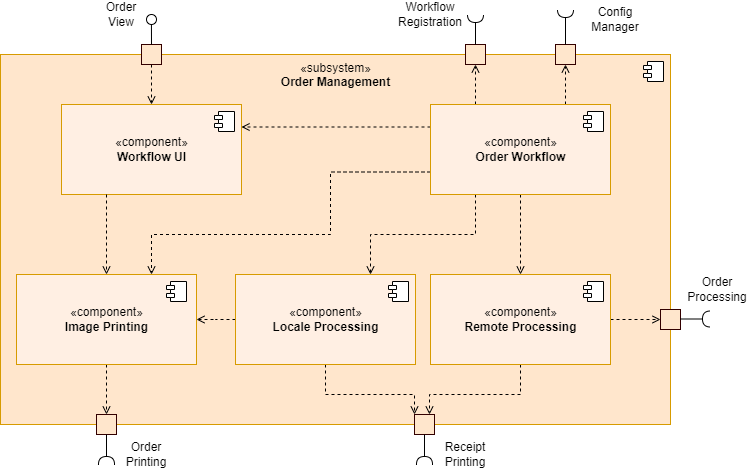
Order Management must decide whether the system is in connected or standalone mode based on a system configuration.
| Name | Responsibility |
|---|---|
| Workflow UI | Contains all views that are dynamically integrated into the main UI. |
| Order Workflow | Aggregates all components of the order management and attaches them to the frame application and workflow based on a configuration. |
| Image Printing | In standalone configuration, this executes the printing of photo products at a local printer. |
| Local Processing | Takes over all processes that are necessary to execute a local print job. This also includes the issuing of a receipt. |
| Remote Processing | Handles all processes that are necessary to have a print job executed by a print partner. This also includes the issuing of a receipt. |
Workflow Management White-Box
This part of the documentation has not been further elaborated as it does not add any value to the actual purpose of the documentation.
Maintenance Management White-Box
This part of the documentation has not been further elaborated as it does not add any value to the actual purpose of the documentation.