
FotoMaX arc42 section 7
Deployment View
The deployment view clarifies the runtime environments in which the individual components of the system are installed and executed.
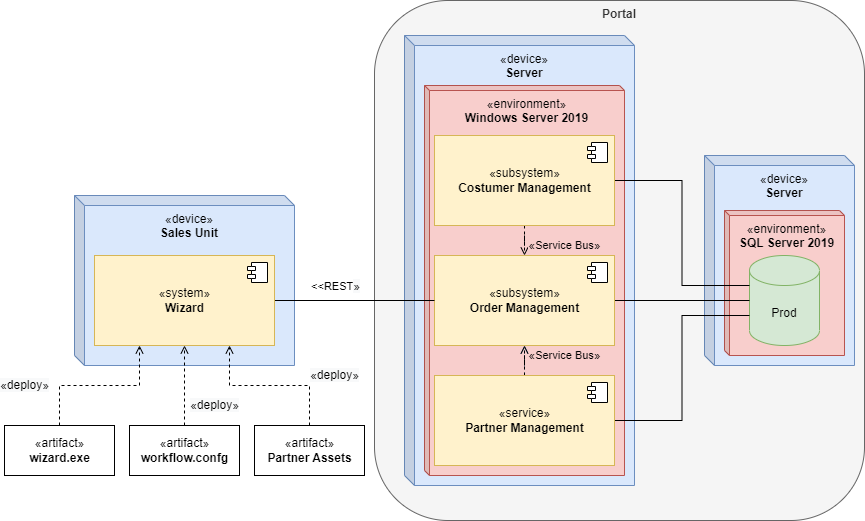
For the sake of clarity, the above illustration only shows the production environment in a simplified form. This does not contain virtualization environments, development environments, staging environments, and fallback servers. A detailed overview can be found in the Infrastructure documentation of the IT department, which is responsible for operations.
The production environment is mirrored in its structure as a test environment. This has two databases, Test and Dev.
| Artifact | Description |
|---|---|
| wizard.exe | Executable file of the wizard, which is installed by a service technician on a sales unit before delivery. Updates are done by the service technician on site. |
| workflow.config | Specially adapted configuration of the workflows for the respective pitch providers. |
| Partner Assets | Logos, fonts, theme, etc. in the corporate identity of the pitch provider. |
| CustomerManagement.svc | Installation package for the Customer Management subsystem installed on the runtime server. |
| OrderManagement.svc | Installation package for the Order Management subsystem installed on the runtime server. |
| PartnerManagement.svc | Installation package for the Partner Management subsystem that is installed on the runtime server. |
| Prod DB | Production database with all customer data. It is backed up incrementally once a day; a full backup is created every Sunday. |
| Test DB | Special database with anonymized test data. This is used for acceptance tests by the departments and for quality assurance. |
| Dev DB | Developer database, which is reset irregularly and is used by the developers to implement new features. It contains only anonymized test data. |