
FotoMaX arc42 section 8
Crosscutting Concepts
This chapter summarizes all concepts that cannot be assigned to a specific application layer, neither from a functional nor a technical point of view.
Exception & Error Handling
This chapter describes what “errors” are, and how they should be handled.
Types of “errors”
Different types of errors can occur within software, therefore not everything that is commonly referred to as an error is also an error in the sense of software development.
We can distinguish between the following scenarios:
- Not visible to the user
- Can be resolved by the software itself
- Cannot be resolved by the software itself
- Visible to the user
- Can be resolved by the user
- Cannot be resolved by the user
This distinction shows that, depending on the situation, handling of unexpected behavior can be passed on to a higher escalation level, which may then contribute to a resolution of the situation. For example, if a file cannot be opened by the software, it makes no sense to crash the entire application with an exception. An appropriate error description should be presented to the user instead, letting them intervene. The user can then decide how to handle the situation and, if necessary, refrain from loading the file at all.
Exceptional Situations vs. “Exceptions”
Exceptions are the usual means of choice in .NET to indicate errors. They have the advantage that they can be checked and logged using appropriate analysis tools. In addition, they automatically contain various environmental information such as a stack trace, the time of occurrence and others. The disadvantage is that they are not necessarily known to the caller. Thus, they may be overlooked, not handled and in the last instance close the entire application. In addition, the information that exceptions contain is not necessarily helpful for the user since it is very technical.
Note: Exceptions should be reserved for exceptional situations or pure programming errors. If an action fails due to a foreseeable event, then that event should be handled appropriately, and no exception should be thrown.
A good example of an exceptional situation can be found in switch case statements, where the list of possible values might change over time. As a result, it is possible that case statements no longer cover all possible combinations. To detect such a problem at an early stage, a corresponding exception can be thrown in the default branch.
decimal calculatedPrice;

switch (customer.Status)
{
  case CustomerStatus.Normal:
    calculatedPrice = CalculatePrice(order);
    break;
  case CustomerStatus.VIP:
    calculatedPrice = CalculateSpecialPrice(order);
    break;
  default:
    throw new InvalidEnumArgumentException($"Unknown customer status!");
}
Not Exceptional
Exceptions are intended for exceptional situations, but how do you deal with non-exceptional situations? A result object is provided for this purpose. This contains both technical error descriptions and error descriptions that a user can follow. The result object can therefore also be used to inform users about a problem situation and, if necessary, to prompt them to take countermeasures.
In the following example, this is illustrated by first checking whether the correct data has been transferred or not in the case of a division. If not, this is communicated to the user so that they can correct their input if necessary.
public Result<float> Divide(int dividend, int divisor)
{
    if(divisor == 0)
    {
         return Result.Failed<float>("The divisor was zero thus division was not possible.", "Please change the input.");
    }

    return Result.Success<float>(dividend / divisor);
}
The example is deliberately simplistic and may lead to discussions. Whether a result object should be used or not is in fact very much a contextual decision. Within components it is quite possible to return concrete data types, as long as no errors can occur at all, or an error is so severe that it must lead to an exception.
Handling Errors
There are several ways to handle errors. In the following section, we will briefly discuss these to give you a better sense of what to think about in each case.
Ignore
If possible, error conditions should not occur in the first place. If an error is so unlikely that concrete handling seems too costly, then it should at least be logged. However, this should be discussed with the product owner and quality assurance.
Retry
Based on the context, it can be quite helpful to simply try an action again if it does not succeed instead of throwing an exception immediately. However, this should be discussed with the product owner and quality assurance.
Logging
Logging is a very extensive topic and has therefore been moved to a separate chapter (→ Logging).
User Interactions
In case of an error, interaction with the user is possible in two ways.
- Notifications - information for the user without direct influence on the processing. Example: “System configuration faulty, Sales Unit is shutting down!”
- Confirmation - Information for the user, which requires an input from them, whereby they can influence the processing. Example: “File could not be read. Should it be tried again? Yes/No”
Special case: Final Exception Handler
It may happen that exceptions are not caught. In that case they end up in the final exception handler. This logs the error and shuts down the application in a structured way. Such errors should not occur in a production environment!
Logging
Why should you log?
When searching for the causes of errors, it is very helpful to know how the software behaves in its real environment. This is particularly important in the context of the wizard, since the sales units represent closed systems that are difficult to access from the outside. Remote debugging or similar is not possible at the current time. The production logs are therefore the only way to obtain information about the use and status of the sales unit.
How should you log?
The ILogger interface is used for logging in the portal and in the wizard. This is provided centrally and can be requested by any class via its constructor.
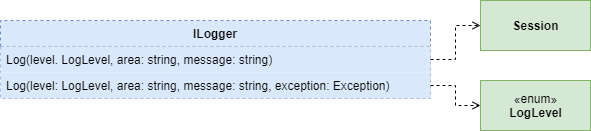
Log Level
| Level | Meaning |
|---|---|
| Fatal | A Fatal log entry is written whenever the stability of the entire software is negatively affected. For example, a Fatal Log should always be written by the Final Exception Handler if exceptions occur that were not handled. |
| Error | Error log entries indicate that something has happened that should not have happened, without automatically affecting the stability of the software. The most common case for error logs are caught exceptions that could be handled. |
| Warning | Warnings are not necessarily errors, but indicate that something is wrong. They can occur, for example, if the connection to the printer is lost. In such a case, the code writes a warning and tries to reconnect after a few seconds. If it cannot establish a connection after several further attempts, it logs an error instead of a warning. If the error persists for a long time, it would result in a Fatal log entry. |
| Information | Information can basically be anything that is useful to understand the relationships in the software. This is not error information since that is already covered by other log levels. |
| Debug | Debug logs are used when debugging by developers. This log level is not available in the production environment and is only used in the test environments. |
What should you log?
In addition to the log level and possible exceptions, the context in which the information occurred and when the log was written must also be logged. The more meaningful the logs, the easier it is to analyze them later.
What should not be logged?
Logged data must not allow any conclusions to be drawn about individuals, including contact details. Furthermore, it is not permitted to write account details or similar sensitive information in the log. In order to allow better traceability through the different layers or services, a unique session ID is automatically assigned to each order transaction, and this is automatically part of each log message.
Domain Model
The domain model is a domain-oriented data model that helps both in the design of interfaces and in the communication between the various project participants. The following domain model describes the considerations in the context of the business processes of the FotoMaX company.
The following domain model is highly simplified and serves the purpose of a practical training. Therefore, it does not claim to be factually correct in its entirety. For example, large parts of Customer Management and Partner Management are missing. The domain Operations will only be found in this chapter and in no other, as it would have greatly complicated all other examples.
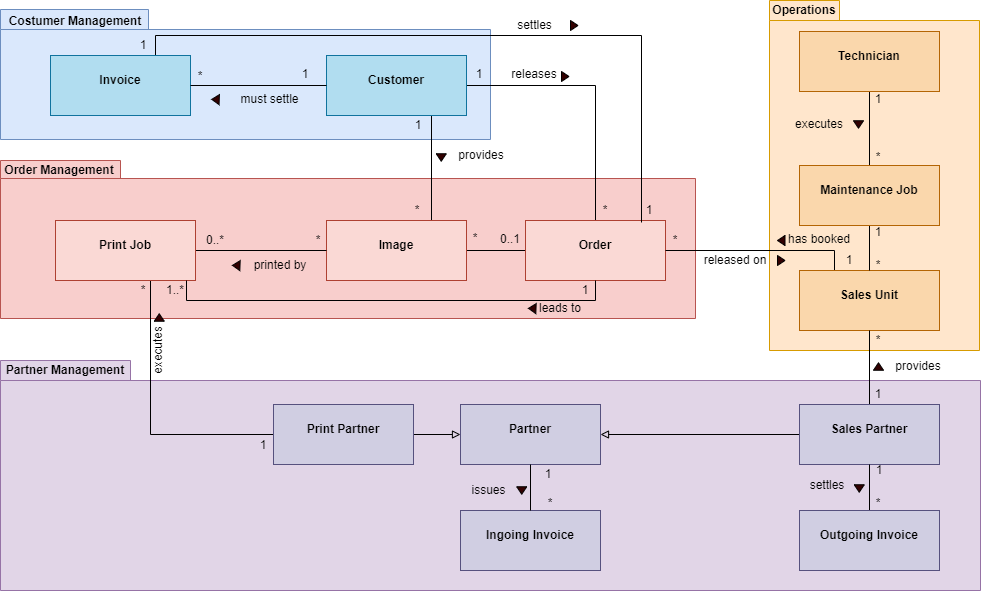
| Entity | Description |
|---|---|
| Customer | Customer who initiates an order and provides images. Both activities can be done via a website, app or a sales unit. |
| Invoice | End customer invoice that settles the amount due resulting from an order. In the standalone case there is no connection to the customer. |
| Order | Order that is triggered by a Customer. If it was booked through a Sales Unit, a connection to the Sales Partner that enabled the order is established through that Sales Unit. |
| Image | Image provided by the customer. If provided via app or website, an order does not necessarily have to be triggered. Images can be printed multiple times and therefore belong to multiple Print Jobs. There are local print jobs (standalone) and remote print jobs (connected). |
| Print Job | Contains images that are forwarded together with various parameters to a print partner for the actual printing. An order on a sales unit automatically leads to the creation of a print job. |
| Partner | Prints print jobs and invoices the related services as Incoming Invoice. |
| Print Partner | Prints print jobs and invoices the related services as Incoming Invoice. |
| Sales Partner | Establishes sales units. In the connected case, receives a commission for each order placed, which is paid as an Incoming Invoice. In standalone mode, a monthly fee is issued as an outgoing invoice. |
| Incoming Invoice | An invoice issued by a partner and to be paid by FotoMaX. |
| Outgoing Invoice | An invoice issued by FotoMaX to a partner. |
| Sales Unit | A sales unit that is set up at a sales partner and triggers orders. |
| Maintenance Job | A maintenance order to a technician for one or more sales units. |
| Service Technician | Service technician who accepts and processes maintenance orders for sales units. |