
FotoMaX arc42 section 10
Quality Requirements
In the original this chapter comes second, directly after the introduction. The author explains why in About this document.
This chapter prioritizes the quality attributes of the software based on ISO 25010 and explains the associated decisions.
Prioritization
The prioritization of the quality attributes of the system was carried out with the involvement of the stakeholders (→ Stakeholders). It was initially executed for the sales unit then modified later to incorporate the portal:
| Priority | Attribute | Explanation |
|---|---|---|
| 1 | Functionality | The functional correctness and completeness of the software has top priority, as no logical errors may occur during operation and all workflows or processes must be implemented in a way that leads to a successful order. |
| 2 | Usability | The software must be easy to use by people with different levels of technical knowledge and be perceived as appealing. It must be possible to place an order as quickly and conveniently as possible to attract walk-in customers. |
| 2 | Security | The sales units are located in a public space and offer various possibilities for data transmission. |
| 3 | Maintainability | The software system is comparatively extensive and must be able to be redesigned for different partners, so it should be modular and easily testable for different configurations. |
| 3 | Availability | If the service is not available, it does not generate any revenue. Therefore, it must always be possible to place orders locally on sales units. The actual transfer of orders to the central services can take place with a certain delay. |
| 3 | Efficiency | The expected load on the units is comparatively low, since they can only be used by one person at the same time. When implementing the system, consideration must be given to the manufacturing and hardware costs. |
| 3 | Compatibility | The software is primarily used for ordering photo products, so there should be compatibility with common image formats. It should also be possible to retrieve data from common capture devices without much effort. |
| 4 | Portability | The runtime environment, including both hardware and software, rarely changes and thus the system does not need to be portable at all. |
Legend:
| Priority | Meaning | Compromises |
|---|---|---|
| 1 | Very important | Compromises are only possible in absolute exceptional cases. |
| 2 | Important | Compromises are only allowed if features with higher priority are strengthened. |
| 3 | Significant | Compromises are possible, as long as the core requirements are not disturbed. |
| 4 | Negligible | The characteristic is only to be considered to a minor extent. |
Quality Scenarios
The following scenarios specify how exactly the software system should behave in certain situations and what compromises may be possible.
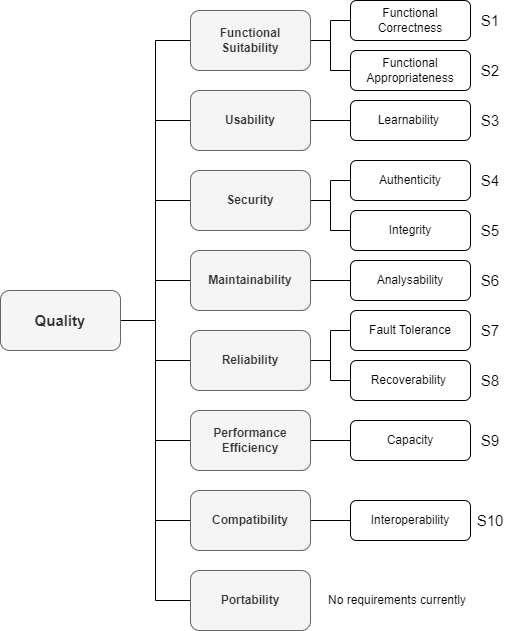
| # | Attribute | Description |
|---|---|---|
| S1 | Functional Correctness | When a customer places an order, the system must round the final amount in a commercially correct manner. |
| S2 | Functional Appropriateness | When a standard photo is ordered, it is subjected to compression. Compression artifacts must not be visible to the naked eye in the printed version of the photo. |
| S3 | Learnability | A user who has not seen the software before must be able to order four different photo products within five minutes. |
| S4 | Authenticity | When persons identify themselves as service technicians, all changes to the system must be automatically and immediately logged in an unalterable way. |
| S5 | Integrity | If the software is started and an unknown file has been placed in the configuration directory, then the start must be aborted with an error message. |
| S6 | Analyzability | New developers must be able to make value-adding changes to the software within one week. |
| S7 | Error Tolerance | If the user enters invalid characters in an order, the error is highlighted to the user at the location of the error and the further order processing is blocked. |
| S8 | Recoverability | If the device is restarted after an error, a sanity check runs and an error report is provided for further analysis, logging all errors that occurred. |
| S9 | Capacity & Time Behavior | If a customer orders 1000 different images with a total size of one gigabyte, he must receive an order confirmation within five minutes. |
| S10 | Interoperability | If a service technician connects a new printer, it must be operational within ten minutes without installing special drivers. |