
FotoMaX arc42 section 6
Runtime View
All dynamic relationships that are to be highlighted are described in the runtime view chapter.
Application frame: Steps of the module initialization
Below is the sequence that is run through during program startup for each module to initialize itself and its managed components.
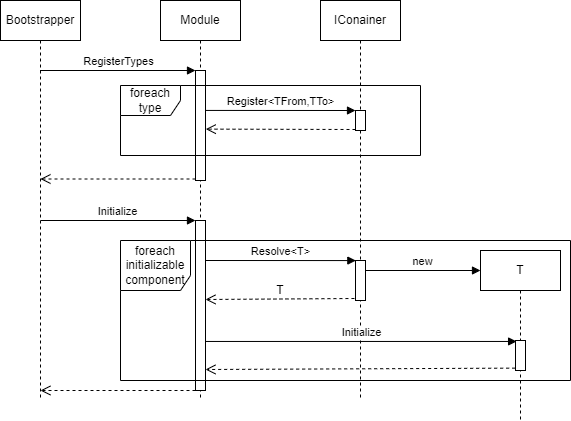
Not every type has to be initialized by the module itself. This is only necessary for module components which actually require a special initialization. If possible, components should be initialized asynchronously here, so that they do not delay the start.
Order Management: Initialization
Like any other module, the Order Management is initialized during the program start. Depending on whether the Wizard is operated in standalone or connected mode, a different procedure for the order process has to be chosen. The following image shows the processes that have to be executed during the initialization of the workflow module to load the correct components.
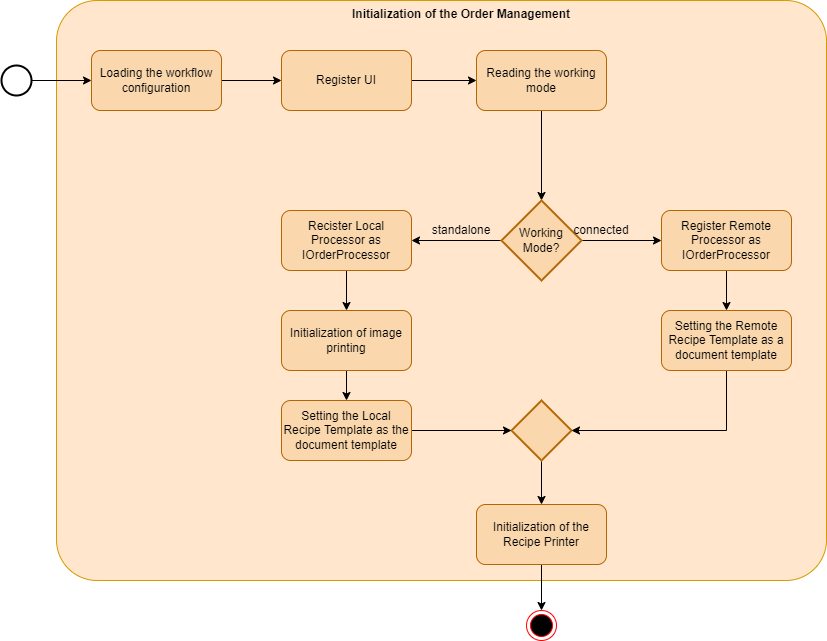
Note: The same document printer is always installed in the sales unit, therefore it can be decided via the selection of a template whether a remote order or a local order is to be issued.