
HtmlSanityCheck arc42 section 1
Introduction and Goals
Content and Motivation
This section shows the driving forces for architecturally relevant decisions and important use-cases or features, summarized in a few sentences. If possible, refer to existing requirements documentation.
The main goal of this section is enabling your stakeholders to understand the solution, which is detailed in arc42-sections 3 to 12.
HtmlSC supports authors creating digital formats by checking hyperlinks, images and similar resources.
1.1 Requirements Overview
Content and Motivation
You like to briefly explain important goals and requirements, use-cases or features of the system. If available, refer to existing requirements documentation.
Most important: Readers can understand the central tasks of the system, before they encounter the architecture of the system (starting with arc42-section 3).
The overall goal of HtmlSC is to create neat and clear reports, showing errors within HTML files. Below you find a sample report.
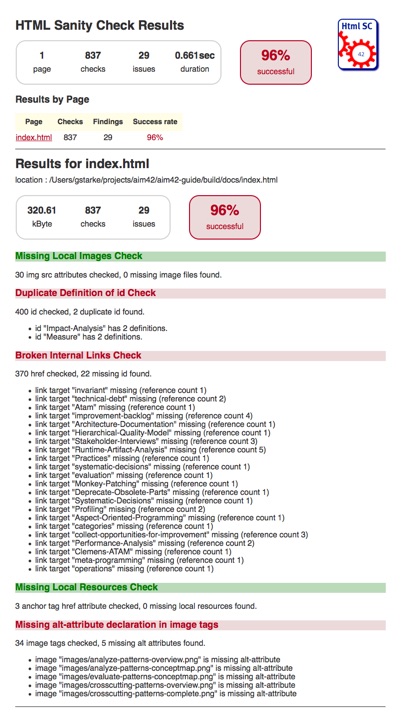
HtmlSanityCheck (HtmlSC) checks HTML for semantic errors, like broken links and missing images. It has been created to support authors who create HTML as output format.
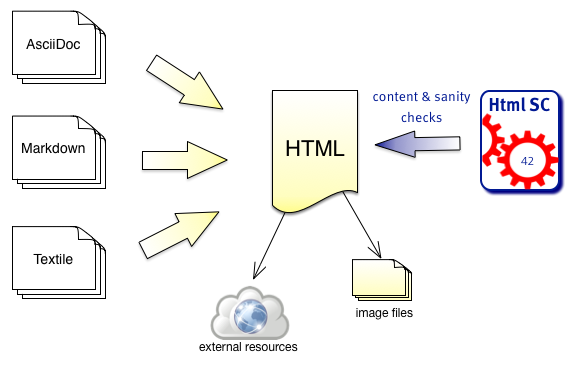
- Authors write in formats like AsciiDoc, Markdown or other formats, which are transformed to HTML by the corresponding generators.
- HtmlSC checks the generated HTML for broken links, missing images and other semantic issues.
- HtmlSC creates a test report, similar to the well-known unit test report.
Basic Usage
- A user configures the location (directory and filename) of one or several HTML file(s), and the corresponding images directory.
- HtmlSC performs various checks on the HTML and
- reports its results either on the console or as HTML report.
HtmlSC can run from the command line or as Gradle plugin.
Basic Requirements
| ID | Requirement | Explanation |
|---|---|---|
| G-1 | Check HTML for semantic errors | HtmlSC checks HTML files for semantic errors, like broken links. |
| G-2 | Gradle and Maven Plugin | HtmlSC can be run/used as Gradle and Maven plugin. |
| G-3 | Multiple input files | Configurable for a set of files, processed in a single run, HtmlSC produces a joint report. |
| G-4 | Suggestions | When HtmlSC detects errors, it shall identify suggestions or alternatives that might repair the error. |
| G-5 | Configurable | Several features of checks shall be configurable, especially input files/location, output directory, timeouts and status-code behavior for checking external links etc. |
Required Checks
HtmlSC shall provide the following checks in HTML files:
| Check | Explanation |
|---|---|
| Missing images | Check all image tags if the referenced image files exist. |
| Broken internal links | Check all internal links from anchor-tags (`href=”#XYZ”) if the link targets “XYZ” are defined. |
| Missing local resources | Check if referenced files (e.g. css, js, pdf) are missing. |
| Duplicate link targets | Check all link targets (… id=”XYZ”) if the id’s (“XYZ”)are unique. |
| Malformed links | Check all links for syntactical correctness. |
| Illegal link targets | Check for malformed or illegal anchors (link targets). |
| Broken external links | Check external links for both syntax and availability. |
| Broken ImageMaps | Though ImageMaps are a rarely used HTML construct, HtmlSC shall identify the most common errors in their usage. |
1.2 Quality Goals
Content and Motivation
You want to understand the quality goals (aka architeture goals), so you can align architecture and design decisions with these goals.
These (usually long term) quality goals diverge from the (usually short term) goals of development projects. Mind the difference! See also arc42-section 10.
| Priority | Quality Goal | Scenario |
|---|---|---|
| 1 | Correctness | Every broken internal link (cross reference) is found. |
| 1 | Correctness | Every potential semantic error is found and reported. In case of doubt1, report and let the user decide. |
| 1 | Safety | Content of the files to be checked is never altered. |
| 2 | Flexibility | Multiple checking algorithms, report formats and clients. At least Gradle and command-line have to be supported. |
| 2 | Correctness | Correctness of every checker is automatically tested for positive AND negative cases. |
| 3 | Performance | Check of 100kB html file performed under 10 secs (excluding Gradle startup) |
1.3 Stakeholders
Content and Motivation
You want an overview of persons, roles or organizations that affect, are affected by or can contribute to the system and its architecture. Make the concrete expectations of these stakeholders with respect to the architecture and its documentation explicit. Collect these in a simple table.
Remark: For our simple HtmlSC example we have an extremely limited number of stakeholders, in real-life you will most likely have many more stakeholders!
| Role | Description | Goal, Intention |
|---|---|---|
| Documentation author | writes documentation with HTML output | wants to check that the resulting document contains good links, image references. |
| arc42 user | uses arc42 for architecture documentation | wants a small but practical example of how to apply arc42. |
| software developer | wants an example of pragmatic architecture documentation |
-
Especially when checking external links, the correctness of links depends on external factors, like network availability, latency or server configuration, where HtmlSC cannot always identify the root cause of potential problems. ↩