HtmlSanityCheck arc42 section 8
Cross-cutting Concepts
Content and Motivation
You should explain cross-cutting and ubiquitous rules of your system. arc42 calls them concepts: They often affect multiple building blocks and are relevant in several parts of the system and its implementation. Examples include:
- Rules for the usage of technologies and/or frameworks
- Implementation rules, design or architecture patterns used
8.1 Domain Model
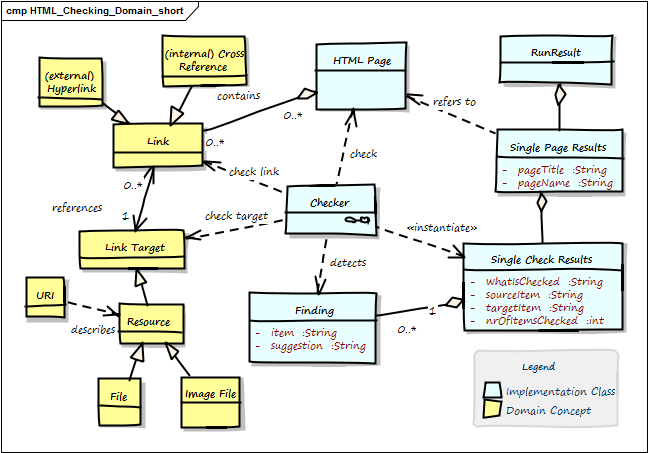
Properties of the implementation classes are private, as we manipulate these via getter/setter methods.
| Term | Description |
|---|---|
| Anchor | Html element to create ->Links. Contains link-target in the form <a href="link-target"> |
| Cross Reference | Link from one part of the document to another part within the same document. Special form of ->Internal Link, with a ->Link Target in the same document. |
| External Link | Link to another page or resource at another domain. |
| Finding | Description of a problem found by one ->Checker within the ->Html Page. |
| Html Element | HTML pages (documents) are made up by HTML elements .e.g., <a href="link target">, <img src="image.png"> and others. See the definition from the W3-Consortium |
| Html Page | A single chunk of HTML, mostly regarded as a single file. Shall comply to standard HTML syntax. Minimal requirement: Our HTML parser can successfully parse this page. Contains ->Html Elements. Synonym: Html Document. |
| id | Identifier for a specific part of a document, e.g. <h2 id="#someHeader">.Often used to describe ->Link Targets. |
| Internal Link | Link to another section of the same page or to another page of the same domain. Also called ->Cross Reference or Local Link. |
| Link | Any a reference in the ->Html Page that lets you display or activate another part of this document (->Internal Link) or another document, image or resource (can be either ->Internal (local) or ->External Link). Every link leads from the Link Source to the Link Target. |
| Link Target | Target of any ->Link, e.g. heading or any other a part of ->Html Documents, any internal or external resource (identified by URI). Expressed by ->id. |
| Local Resource | Local file, either other Html files or other types (e.g. pdf, docx) |
| Run Result | The overall results of checking a number of pages (at least one page). |
| Single Page Result | A collection of all checks of a single ->Html Page. |
| URI | Universal Resource Identifier. Defined in RFC-2396, the ultimate source of truth concerning link syntax and semantic. |
8.2 Structure of HTML Links
Remark: For many web developers or HTML experts the following information on URI syntax might be completely evident. As we wrote this book also for different kind of people, we included this information anyhow.
HtmlSC performs various checks on HTML links (hyperlinks), which usually follow the URI syntax specified by RFC-2396. URIs are generally used to link to arbitrary resources (documents, files or parts within documents).
Their general structure is depicted in the following figure - you also find a unit test below.
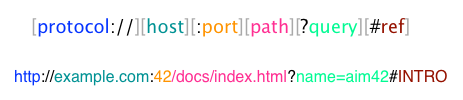
Test showing generic URI syntax
@Test
public void testGenericURISyntax() {
    // based upon an example from the Oracle(tm) Java tutorial:
    // https://docs.oracle.com/javase/tutorial/networking/urls/urlInfo.html
    def aURL = new URL(
        "https://example.com:42/docs/tutorial/index.html?name=aim42#INTRO");
    aURL.with {
        assert getProtocol() == "http"
        assert getAuthority() == "example.com:42"
        assert getHost() == "example.com"
        assert getPort() == 42
        assert getPath() == "/docs/tutorial/index.html"
        assert getQuery() == "name=aim42"
        assert getRef() == "INTRO"
    }
}
8.3 Multiple Checking algorithms
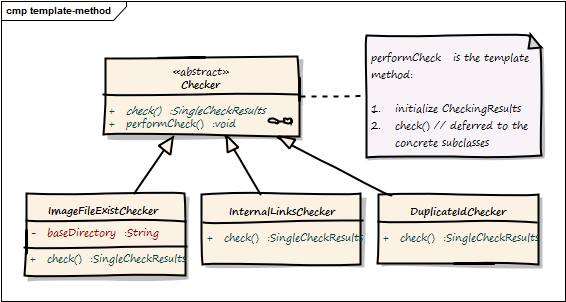
HtmlSC uses the template-method-pattern to enable flexible checking algorithms:
“The Template Method defines a skeleton of an algorithm in an operation, and defers some steps to subclasses”.
We achieve that by defining the skeleton of the checking algorithm in one operation (performCheck), deferring the specific checking algorithm steps to subclasses. The invariant steps are implemented in the abstract base class, while the variant checking algorithms have to be provided by the subclasses.
Template method for performing a single type of checks
/**
  * Prerequisite: pageToCheck has been successfully parsed,
  * prior to constructing this Checker instance.
**/
public CheckingResultsCollector performCheck() {
    // assert prerequisite
    assert pageToCheck != null
    initResults()
    return check() // subclass executes the actual checking algorithm
}
| Component | Description |
|---|---|
| Checker | abstract base class, containing the template method check() plus the public method performCheck() |
ImageFileExistChecker |
checks if referenced local image files exist |
InternalLinksChecker |
checks if cross references (links referenced within the page) exist |
DuplicateIdChecker |
checks if any id has multiple definitions |
8.4 Reporting
HtmlSC supports the following output (== reporting) formats and destinations:
- formats (HTML and text) and
- destinations (file and console)
The reporting subsystem uses the template method pattern to allow different output formats (e.g. Console and HTML). The overall structure of reports is always the same.
The (generic and abstract) reporting is implemented in the abstract Reporter class as follows:
Report findings using TemplateMethod pattern
/**
 * main entry point for reporting - to be called when a report is requested
 * Uses template-method to delegate concrete implementations to subclasses
*/
    public void reportFindings() {
        initReport()            // (1)
        reportOverallSummary()  // (2)
        reportAllPages()        // (3)
        closeReport()           // (4)
    }

    private void reportAllPages() {
        pageResults.each { pageResult ->
            reportPageSummary( pageResult )                    // (5)
            pageResult.singleCheckResults.each { resultForOneCheck ->
               reportSingleCheckSummary( resultForOneCheck )  // (6)
               reportSingleCheckDetails( resultForOneCheck )  // (7)
               reportPageFooter()
        }
    }
-
initialize the report, e.g. create and open the file, copy css-, javascript and image files.
-
create the overall summary, with the overall success percentage and a list of all checked pages with their success rate.
-
iterate over all pages
-
write report footer - in HTML report also create back-to-top-link
-
for a single page, report the number of checks and problems plus the success rate
-
for every singleCheck on that page, report a summary and
-
all detailed findings for a singleCheck.
-
for every checked page, create a footer, page break or similar to graphically distinguish pages between each other.
The sample report below illustrates this.