
HtmlSanityCheck arc42 section 7
Deployment View
Content and motivation
For stable operation, you need to know the technical infrastructure in which your system will run. This is especially important if your software is distributed or deployed on several different machines, application servers or containers.
Sometimes you need to know about different environments (e.g. development, test, production). For large commercial or web systems, aspects such as scalability, clustering, automatic provisioning, firewalls and load balancing also play an important role.
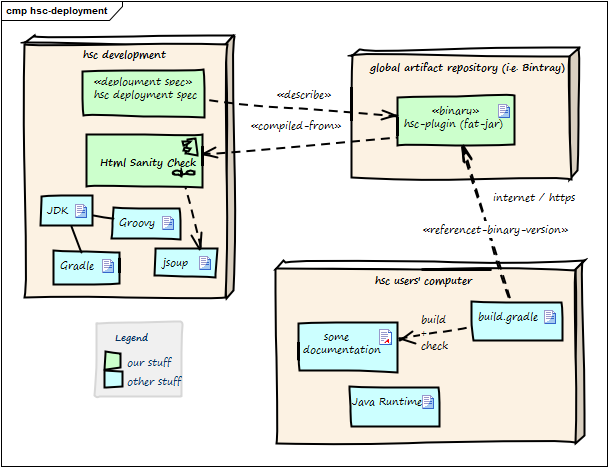
| Node / Artifact | Description |
|---|---|
| hsc plugin binary | Compiled version of HtmlSC, including required dependencies. |
| hsc-development | Development environment |
| artifact repository | Global public cloud repository for binary artifacts, similar to mavenCentral HtmlSC binaries are uploaded to this server. |
| hsc user computer | Where documentation is created and compiled to HTML. |
| build.gradle | Gradle build script configuring (among other things) the HtmlSC plugin. |
The three nodes (computers) shown in the diagram above are connected via Internet.
Prerequisites:
- HtmlSC developers need a Java development kit, Groovy, Gradle plus the JSoup HTML parser.
- HtmlSC users need a Java runtime (> 1.6) plus a build file named
build.gradle. See below for a complete example.
Example for build.gradle
buildscript {
    repositories {
        mavenLocal()
        maven {
            url "https://plugins.gradle.org/m2/"
        }
    }
    dependencies {
        // in case of mavenLocal(), the following line is valid:
        classpath(group: 'org.aim42',

       // in case of using the official Gradle plugin repository:
       //classpath (group: 'gradle.plugin.org.aim42',
      name: 'htmlSanityCheck', version: '1.0.0-RC-3')
    }
}

plugins {
    id 'org.asciidoctor.convert' version '1.5.8'
}

// ==== path definitions =====
ext {
    srcDir = "$projectDir/src/docs/asciidoc"

// location of images used in AsciiDoc documentation
    srcImagesPath = "$srcDir/images"

// (input for htmlSanityCheck)
    htmlOutputPath = "$buildDir"

    targetImagesPath = "$buildDir/images"
}

// ==== asciidoctor ==========
apply plugin: 'org.asciidoctor.convert'

asciidoctor {
    outputDir = file(buildDir)
    sourceDir = file(srcDir)

    sources {
        include "many-errors.adoc", "no-errors.adoc"  }

    attributes = [
            doctype    : 'book',
            icons      : 'font',
            sectlink   : true,
            sectanchors: true ]

    resources {
        from(srcImagesPath) { include '**' }
        into "./images"  }
}

// ========================================================
apply plugin: 'org.aim42.htmlSanityCheck'

htmlSanityCheck {
    // ensure asciidoctor->html runs first
    // and images are copied to build directory

    dependsOn asciidoctor

    sourceDir = new File("${buildDir}/html5")

    // files to check, in Set-notation
    sourceDocuments = ["many-errors.html", "no-errors.html"]

    // fail the build if any error is encountered
    failOnErrors = false

    // set the http connection timeout to 2 secs
    httpConnectionTimeout = 2000

    ignoreLocalHost = false
    ignoreIPAddresses = false
}

defaultTasks 'htmlSanityCheck'