
HtmlSanityCheck arc42 section 6
Runtime View
Content and Motivation
The runtime view shows behavior, interactions and runtime dependencies of the building blocks in form of concrete scenarios.
It helps you to understand how the building blocks of your systems fulfill their respective tasks at runtime, and how they communicate/interact with each other at runtime.
II.6.1 Execute all checks
A typical scenario within HtmlSC is the execution of all available checking algorithms on a set of HTML pages.
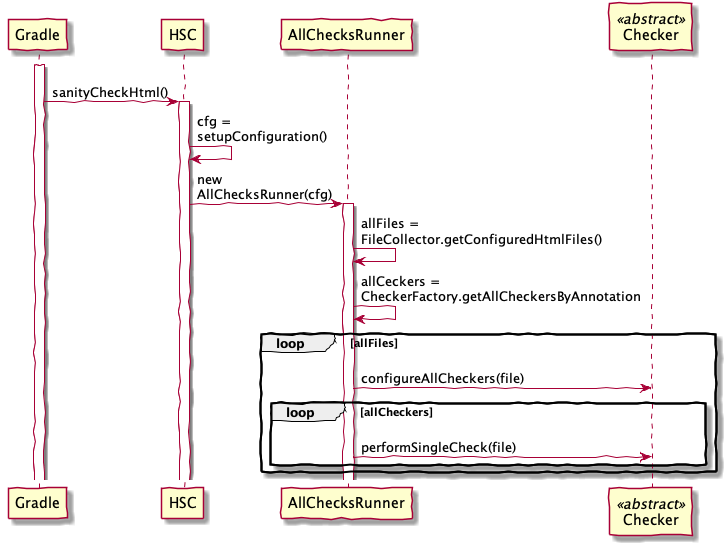
Explanation:
- User or build calls
htmlSanityCheckbuild target. - Gradle (from within build) calls
sanityCheckHtml - HSC configures input files and output directory
- HSC creates an
AllChecksRunnerinstance - gets all configured files into
allFiles - (planned) get all available Checker classes based upon annotation
- perform the checks, collecting the results
II.6.2 Report checking results
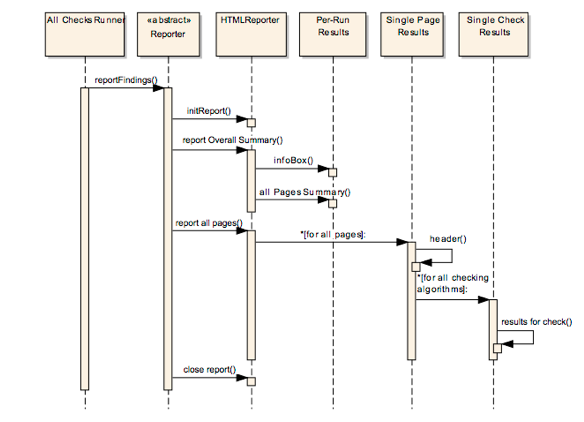
Reporting is done in the natural hierarchy of results (see the corresponding concept in section 8.2.1 for an example report).
- per “run” (
PerRunResults): date/time of this run, files checked, some configuration info, summary of results - per “page” (
SinglePageResults): - create page result header with summary of page name and results
- for each check performed on this page create a section with
SingleCheckResults - per “single check on this page” report the results for this particular check